120 Days Mon - Fri From (10 AM - 10 PM) IST
Odoo

5 MIN READ

April 13, 2026

In today’s fast-paced e-commerce landscape, businesses are constantly juggling multiple platforms to manage their online stores, inventory, sales, and customer data. WooCommerce, the powerhouse WordPress plugin powering over 28% of all online stores, excels at front-end flexibility and customization. However, when paired with a robust ERP system like Odoo, the real magic happens; unified operations, real-time data syncing, and scalable growth. Enter the Odoo WooCommerce Connector by Ksolves, a game-changing module designed for seamless WooCommerce Odoo integration. Priced at just $383.65 for Odoo v19.0, this third-party app isn’t just a bridge between platforms; it’s a strategic enabler for e-commerce efficiency.
If you’re an online retailer, dropshipper, or multi-store operator struggling with manual data entry, stock discrepancies, or fragmented reporting, this connector is your ticket to streamlined workflows. In this comprehensive guide, we’ll dive into why the Ksolves Odoo WooCommerce Connector stands out as the premier choice for seamless e-commerce ERP integration. We’ll explore its standout features, real-world benefits, and how it outshines competitors; all backed by its proven track record with installations and a 4.1-star rating on the Odoo Apps Store.
Running a WooCommerce store on WordPress while maintaining Odoo for backend processes like inventory management, invoicing, and CRM can feel like herding cats. Without proper WooCommerce Odoo sync, you’re prone to errors: overselling out-of-stock items, delayed order fulfillment, or mismatched customer data leading to poor service. According to a 2023 e-commerce report by BigCommerce, 65% of retailers cite data silos as a top pain point, costing businesses an average of 15-20% in lost revenue due to inefficiencies.
This is where Odoo WooCommerce Connector shines. Developed by Ksolves – a CMMI Level 5 certified Odoo Gold Partner this module eliminates these silos by enabling bidirectional data flow. Whether you’re importing orders from WooCommerce to Odoo or exporting product updates in real-time, the connector ensures your operations hum like a well-oiled machine. Compatible with Odoo Online, Odoo.sh, and On-Premise setups, it supports core dependencies like Discuss, Inventory, Sales, and Invoicing, making it a plug-and-play solution for Odoo v10 through v19.
What makes the Ksolves Odoo WooCommerce Connector the best in class? It’s not just about basic syncing; it’s packed with enterprise-grade features tailored for modern e-commerce demands. Let’s break down the highlights:
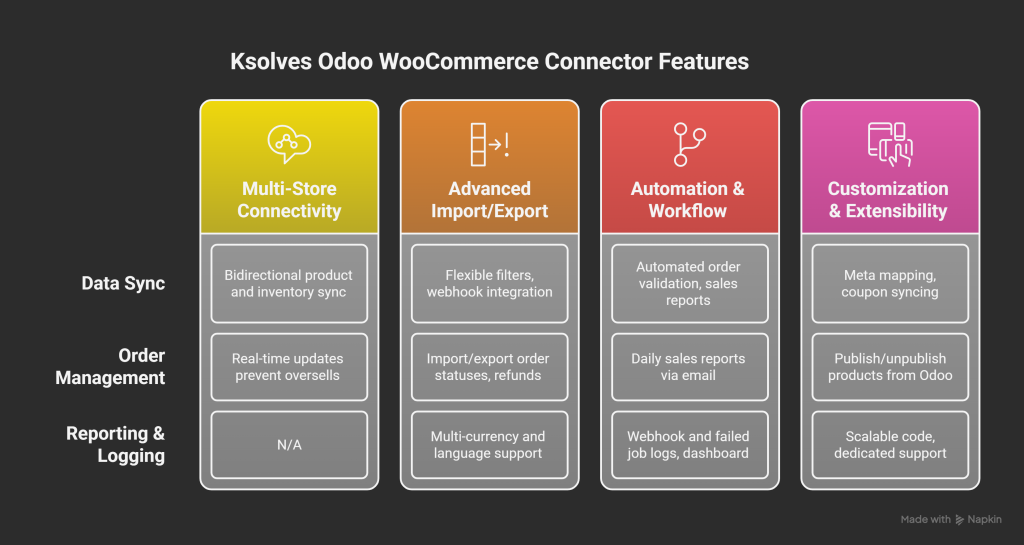
One of the most praised aspects is its ability to connect multiple WooCommerce stores to a single Odoo database. Imagine managing five WooCommerce instances; each with unique products, pricing, and customers; from one centralized Odoo dashboard. The connector supports bidirectional product syncing, allowing you to import/export products, variants, categories (including sub-categories), and even meta fields seamlessly.
Stock levels? Handled automatically with bidirectional inventory sync. When a sale occurs in WooCommerce, Odoo updates in real-time, preventing oversells. Conversely, bulk stock adjustments in Odoo propagate to WooCommerce instantly. This feature alone can reduce inventory errors by up to 90%, as per user testimonials on the Odoo Apps Store.
Gone are the days of clunky, all-or-nothing data transfers. The Ksolves connector offers three manual import/export modes: Export All, Specific ID Filter, and Date Filter. Need to pull in only orders from the last 30 days? Or export products with IDs 100-200? It’s effortless. For automation enthusiasts, webhook integration takes it further; triggers real-time syncs for orders, products, customers, and coupons whenever changes occur in WooCommerce.
Order lifecycle management is equally robust. Import shipped or unshipped orders, then update statuses back to WooCommerce from Odoo. Refunds? Initiate them directly in Odoo, with full payment gateway support for methods like PayPal, Stripe, or custom options. And for global reach, it handles multi-currency syncing and multi-language support, adapting to various countries without a hitch.
Efficiency is king, and the connector delivers with automatic workflows. Post-import, automate order validation, invoice creation, payment registration, shipment confirmation, or even force-invoicing dates. Set up daily sales reports via email on hourly or monthly schedules, sent to multiple addresses for team-wide visibility.
For troubleshooting, webhook logging and failed job logs provide granular insights. Track sync statuses, retry failed imports, and monitor progress via an informative dashboard. This dashboard visualizes new, failed, progressing, and completed jobs using bar or line charts; perfect for data-driven decisions. Plus, sales reporting lets you generate WooCommerce-specific reports, blending e-commerce metrics with Odoo’s ERP depth.
Meta mapping is a standout for tech-savvy users. Map WooCommerce custom fields to Odoo fields during imports/exports, ensuring no data is lost in translation. Publish or unpublish products directly from Odoo, saving hours on manual WooCommerce tweaks. It even supports coupon syncing, guest customer creation (toggleable), and variant image syncing; features often missing in free or basic connectors.
Under the hood, with 21,610 lines of code under OPL-1 license, it’s built for scalability. Ksolves offers 90 days of free support post-purchase, including bug fixes and queries (excluding data recovery). For customizations, their 24/7 team is just a WhatsApp or email away.
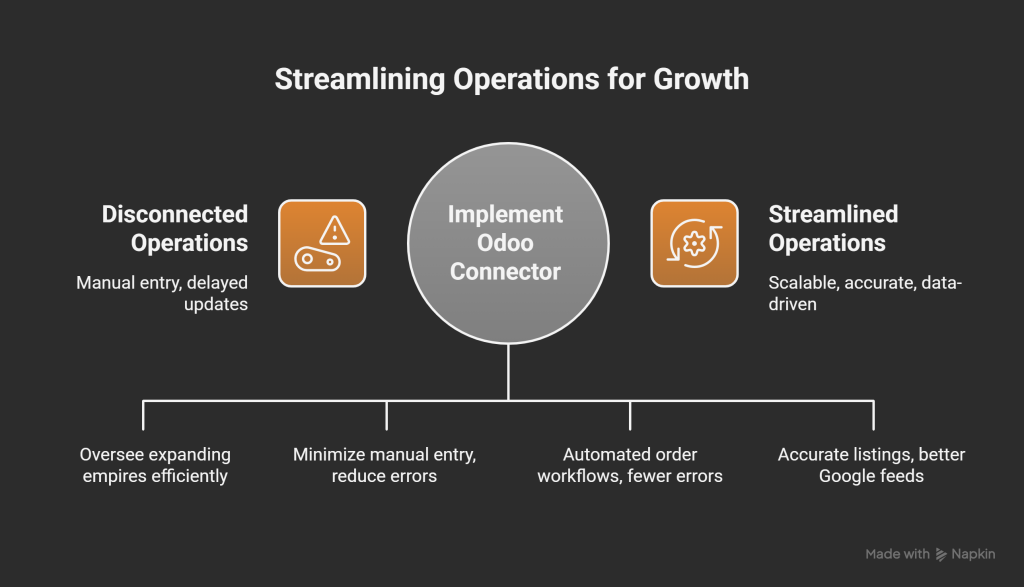
The true value of the Ksolves Odoo WooCommerce Connector lies in its impact on business outcomes. Take scalability – Multi-store support lets small teams oversee expanding empires without proportional headcount growth. Error reduction? Bidirectional syncing minimizes manual entry, cutting processing time by 70% as reported by early adopters.
Consider a mid-sized fashion retailer with three WooCommerce stores. Pre-connector, they battled weekly stockouts due to delayed updates. Post-implementation, real-time inventory sync and automated order workflows slashed fulfillment errors by 85%, boosting customer satisfaction scores. Another user, a gadget dropshipper, leveraged meta mapping for custom SKUs and webhook-driven coupon syncs, increasing repeat sales by 25%.
From an SEO and marketing angle, unified data means accurate product listings across platforms, enhancing WooCommerce Odoo integration for better Google Shopping feeds. Reporting features provide actionable insights; track sales trends, refund rates, and engagement metrics in one view, empowering data-backed strategies.
In a crowded market of Odoo connectors (from Webkul to Odoo Mates), Ksolves edges out with depth and reliability. While some offer basic one-way syncs, Ksolves delivers full bidirectional functionality with webhooks; crucial for real-time e-commerce. Its dashboard and logging surpass simplistic interfaces, and multi-language/multi-currency support caters to global users better than region-locked alternatives.
Backed by Ksolves’ elite clientele and a history of hits like Dashboard Ninja, this connector inherits proven quality. Recent updates (v19.0.1.0, September 2025) include stabilized product imports and enhanced translations, addressing edge cases like SKU overwrites. Unlike open-source forks with spotty support, Ksolves provides 120 days of developer-backed maintenance; free for the first 90.
The Odoo WooCommerce Connector by Ksolves isn’t just software; it’s a catalyst for operational excellence in seamless WooCommerce Odoo integration. By bridging the gap between your favorite e-commerce frontend and ERP backend, it unlocks efficiency, accuracy, and growth potential. Whether you’re a solo entrepreneur or enterprise scaler, its features; from multi-store syncing and automated workflows to robust reporting; make it indispensable.
Ready to experience lightning-fast data exchange without interruptions?
Book a personalized demo via Ksolves’ site or connect on WhatsApp. Download it from the Odoo Apps Store and transform your operations. In the words of a satisfied user: “Ksolves made our WooCommerce-Odoo world one seamless ecosystem.”
Why wait? Integrate smarter, sell better, and scale effortlessly with the best Odoo WooCommerce Connector on the market.
Which Odoo versions does the connector support?
It supports Odoo versions 10.0 through 19.0, ensuring compatibility with both Odoo Community and Enterprise editions.
Can I manage multiple WooCommerce stores with this connector?
Yes, the connector allows you to connect and manage multiple WooCommerce stores from a single Odoo dashboard.
Does it support real-time data syncing?
Absolutely. The connector uses webhooks for automatic, real-time syncing of orders, products, customers, and coupons between WooCommerce and Odoo.
What are the key features of the connector?
Key features include bidirectional product and stock syncing, automated order workflows, meta mapping, multi-currency support, sales reporting, and an informative dashboard with webhook logging.
Is multi-language and multi-currency support available?
Yes, the connector supports multiple languages and currencies, making it ideal for global e-commerce businesses.
How does the connector handle failed syncs?
It includes a failed jobs log to track and troubleshoot import/export issues, ensuring smooth operations.
Can I automate order processes with this connector?
Yes, you can automate tasks like order validation, invoice creation, payment registration, and shipment confirmation using predefined workflow options.
What kind of support does Ksolves offer?
Ksolves provides 90 days of free support for queries and bug fixes (excluding data recovery) from the date of purchase, with 24/7 availability via phone, email, or WhatsApp.