



Manager
 [email protected]
Manager
[email protected]

Book Your Personalised Demo Right Away







List View Manager
Take full control of every list view in Odoo 20: hide,
resize, reorder, and search columns per user, right down
to the One2many and Many2many lists embedded inside your
forms. With multi-chip column search and instant
auto-suggestions on every field type, finding the record
you need takes seconds, not scrolling,
streamlining your workflow and boosting productivity.





Why Use List View Manager
List ViewManager
- ✓Dynamic column management: hide/show, reorder, rename & search
- ✓Live table width slider (30%–100%) from the gear dropdown NEW
- ✓Ability to resize columns, retained per user across sessions
- ✓Multi-chip column search with auto-suggestion on every field type
- ✓Advance Search combined with Odoo's native Group By
- ✓Sr. No in every list view
- ✓Highlight record on hovering
- ✓Distinct highlight color for selected records
- ✓Read/Edit mode toggle, with an Alt+E shortcut
- ✓Safer Bulk Edit: scope choice + type-to-confirm challenge NEW
- ✓LVM inside One2many & Many2many embedded lists NEW
- ✓Ability to duplicate multiple records from the list view
- ✓Copy directly the field value from the list view
- ✓Export Current View of List (visible columns only)
- ✓Manual refresh button to reload list data without page refresh
- ✓One-click option to restore the default list view, with an Alt+R shortcut
- ✓Ability to change header color, header text color & row hover color
- ✓Ability to enable/disable the serial number column
- ✓Group-based access control for LVM features
- ✓Auto-saves list view settings per user
- ✓Sticky header stays pinned while scrolling long lists
- ✓Works out of the box across 16+ Odoo apps: Sales, Purchase, Inventory, Accounting & more



list view

Columns

selected records

Toggle inline editing
with the Alt+E shortcut

View of List

Embedded Lists & Bulk Edit

records from the list view

auto-suggestion on every
field type, including M2O/M2M

Rename, Restore & Filter columns
user-wise in any list view

column search with Odoo's
native search & group-by

the list view without opening the
record
Many2many embedded lists
Scope choice + type-to-confirm
challenge before mass updates
Slider (30%-100%)
Across 16+ Odoo Apps
Ksolves – Your One-Stop Shop for Odoo Solutions
We are available 24/7 for your service. Contact us today!
Unlock Efficiency with Smarter Data Management
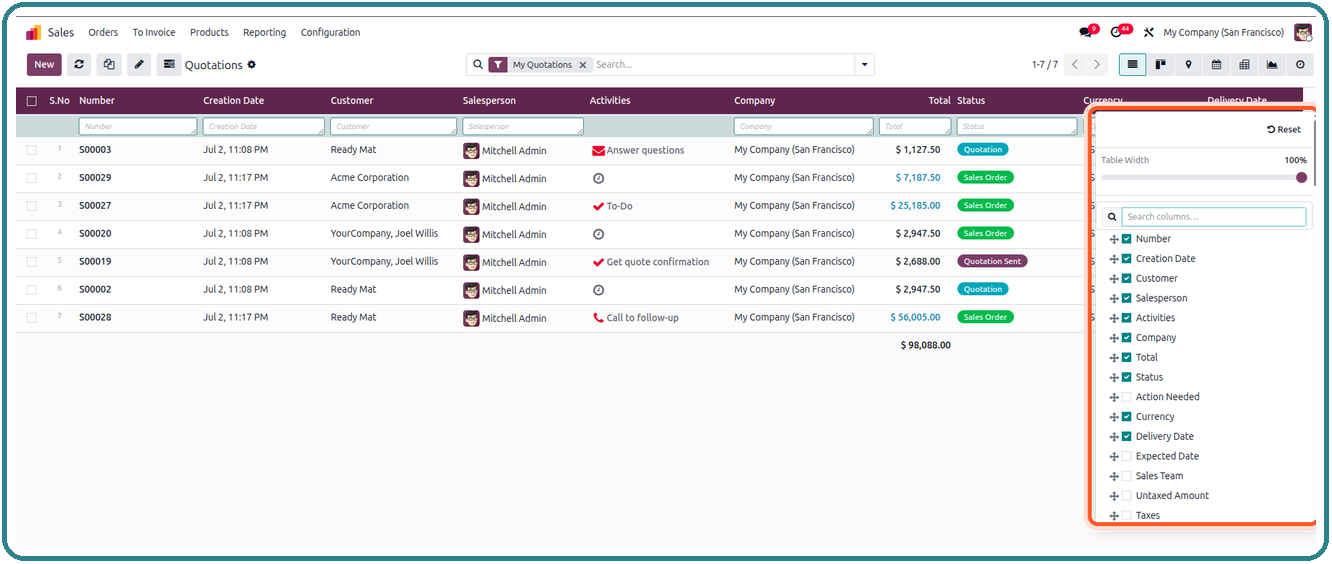
Effortlessly organize your Odoo list view with Dynamic List features available directly in the gear (⚙) dropdown of the control panel. Show, hide, rename, reorder, search and save your column layout, with native drag-and-drop and instant apply, no page reload needed.
Hide/Show columns on any list view

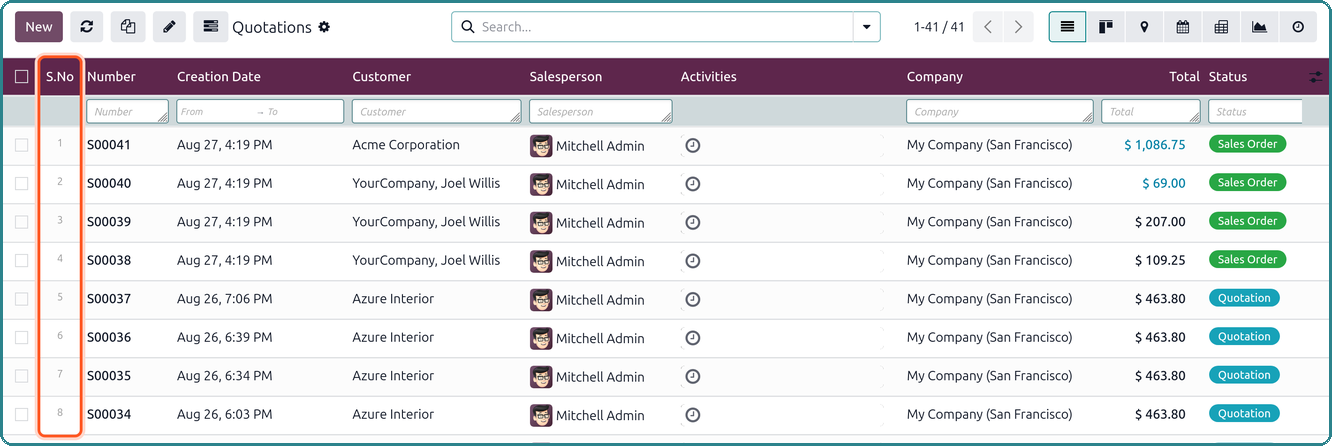
The app automatically assigns a serial number to all records in every list view, providing easy identification and tracking for all entries. It stays perfectly aligned across pagination, grouping, and footer rows.
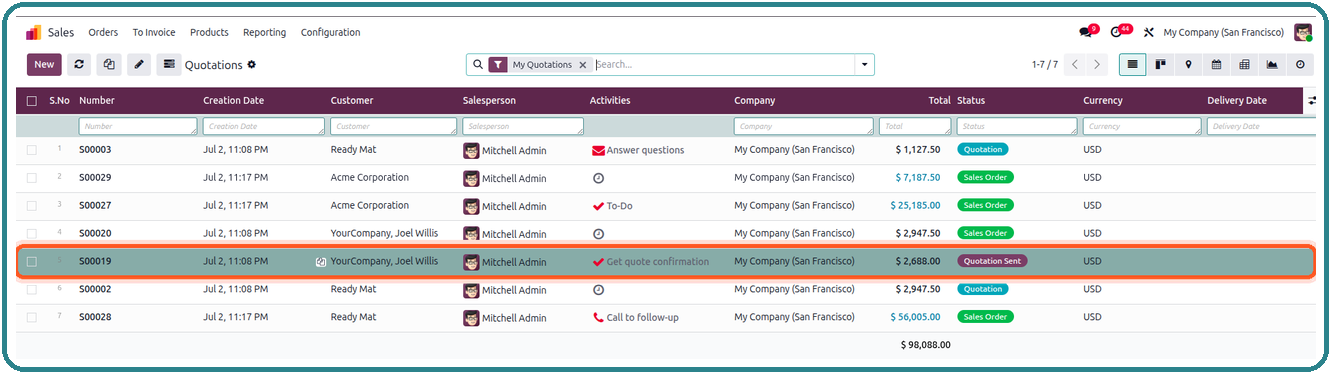
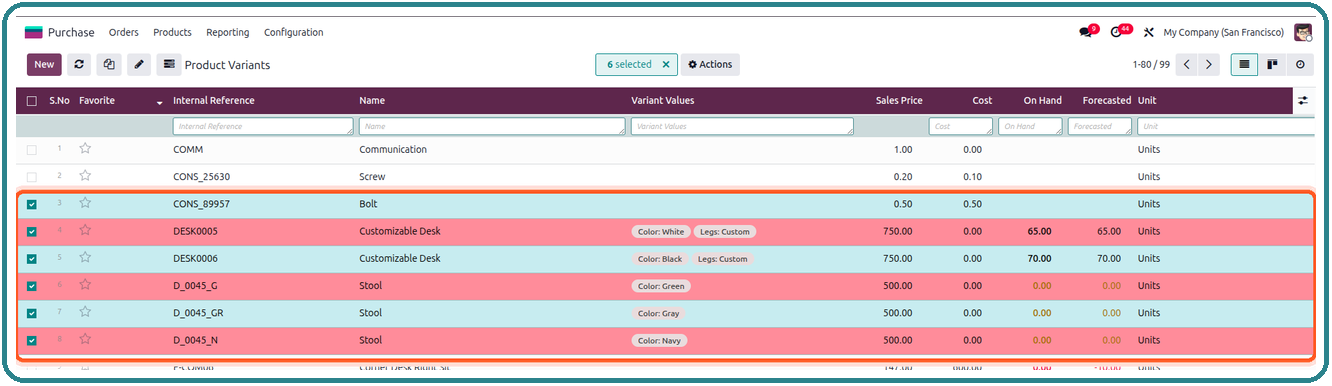
Hover over any record and this Odoo app highlights it instantly for enhanced visibility. Selected records get their own distinct highlight color too, so multi-select actions are never ambiguous.
Copy the field value from any column without the need to open the record. Save time and streamline your workflow by quickly extracting data from any column with a click.

Take List View Manager wherever your data lives: all core features (search, resize, hide/show, reorder) now work inside embedded One2many and Many2many lists, such as Sales Order and Purchase Order lines. Enable it globally from Settings.
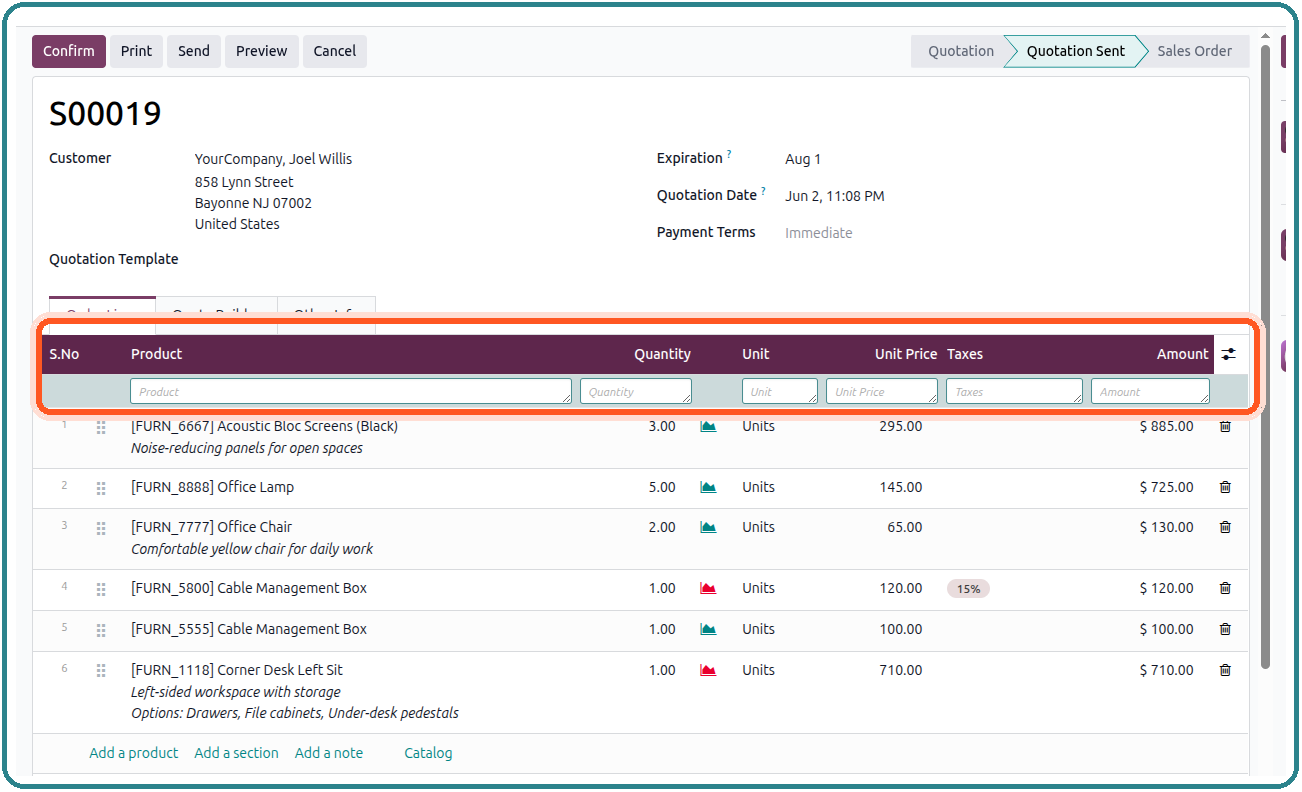
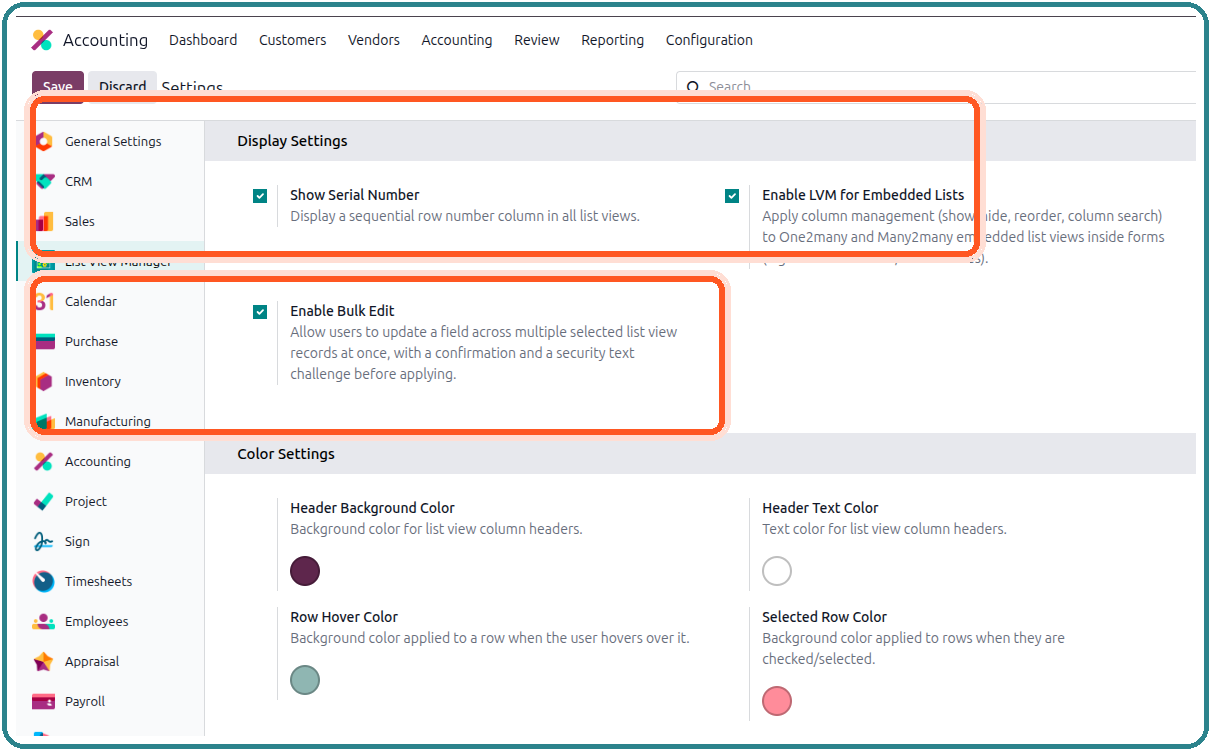
Change the header background/text color and the row hover color, and choose a dedicated color for selected records, all as per your choice. Enable/disable the serial number column, turn LVM on for embedded One2many/Many2many lists, and enable the safer Bulk Edit confirmation flow, all from one settings screen.
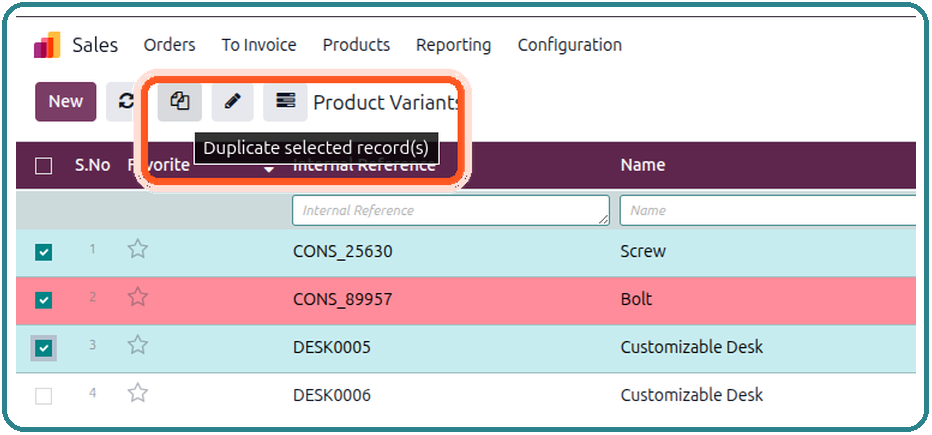
Easily duplicate multiple selected records from the list view in a single click straight from the toolbar with no need to open each record individually.
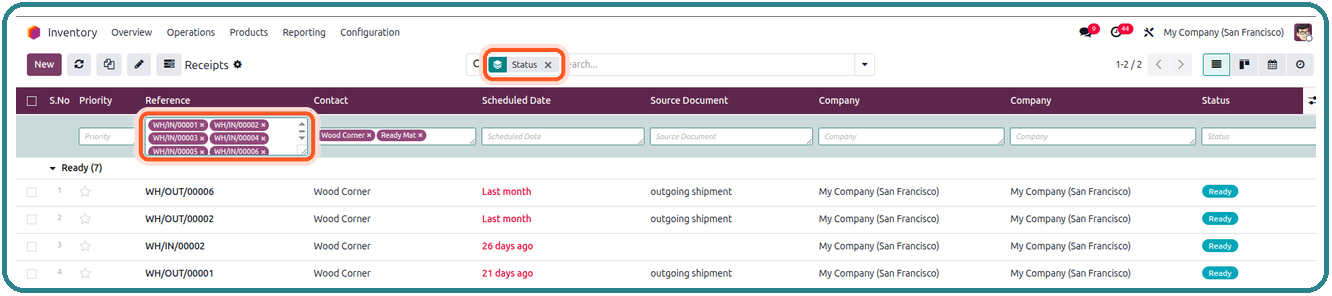
Search by multiple values per column with live auto-suggestions for Many2one/Many2many, Selection, Boolean, and now Char/Text/Integer fields too. Select several suggestions at once (OR within a column, AND across columns) for precise, instant filtering.

Seamlessly search for specific values within any column and get instant results with Advanced Search. Filter data quickly and accurately, making it easier to find exactly what you're looking for without unnecessary delays.

Combine the power of Odoo's default search function with List View Manager's column-specific search to refine your results by group. Effortlessly filter and find relevant records within large datasets based on specific groups.
Easily resize columns within the list view to suit your needs, and retain those settings even after reopening the view, unlike Odoo's default list view, which resets to the original settings. Remaining space is automatically redistributed so the table always stays flush.
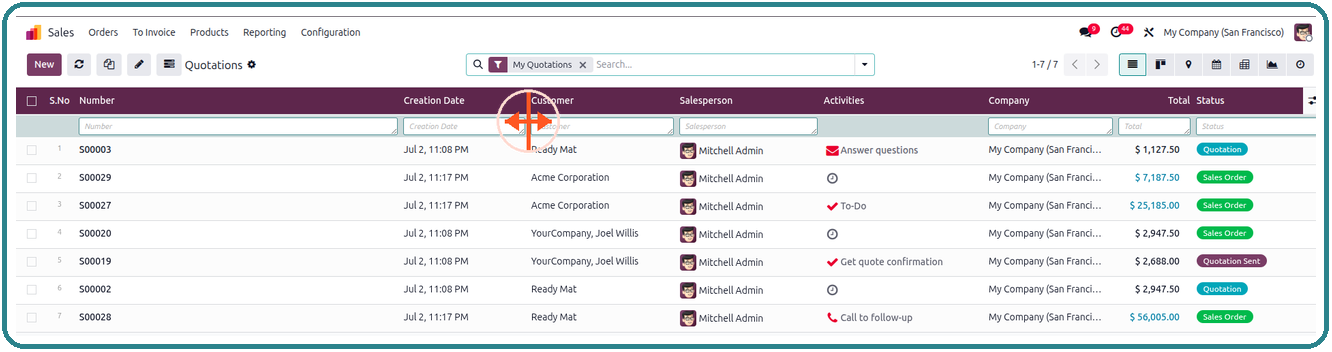
Reload your data with a simple click of the refresh button from the top menu, or the keyboard shortcut, without the need to refresh the entire page.

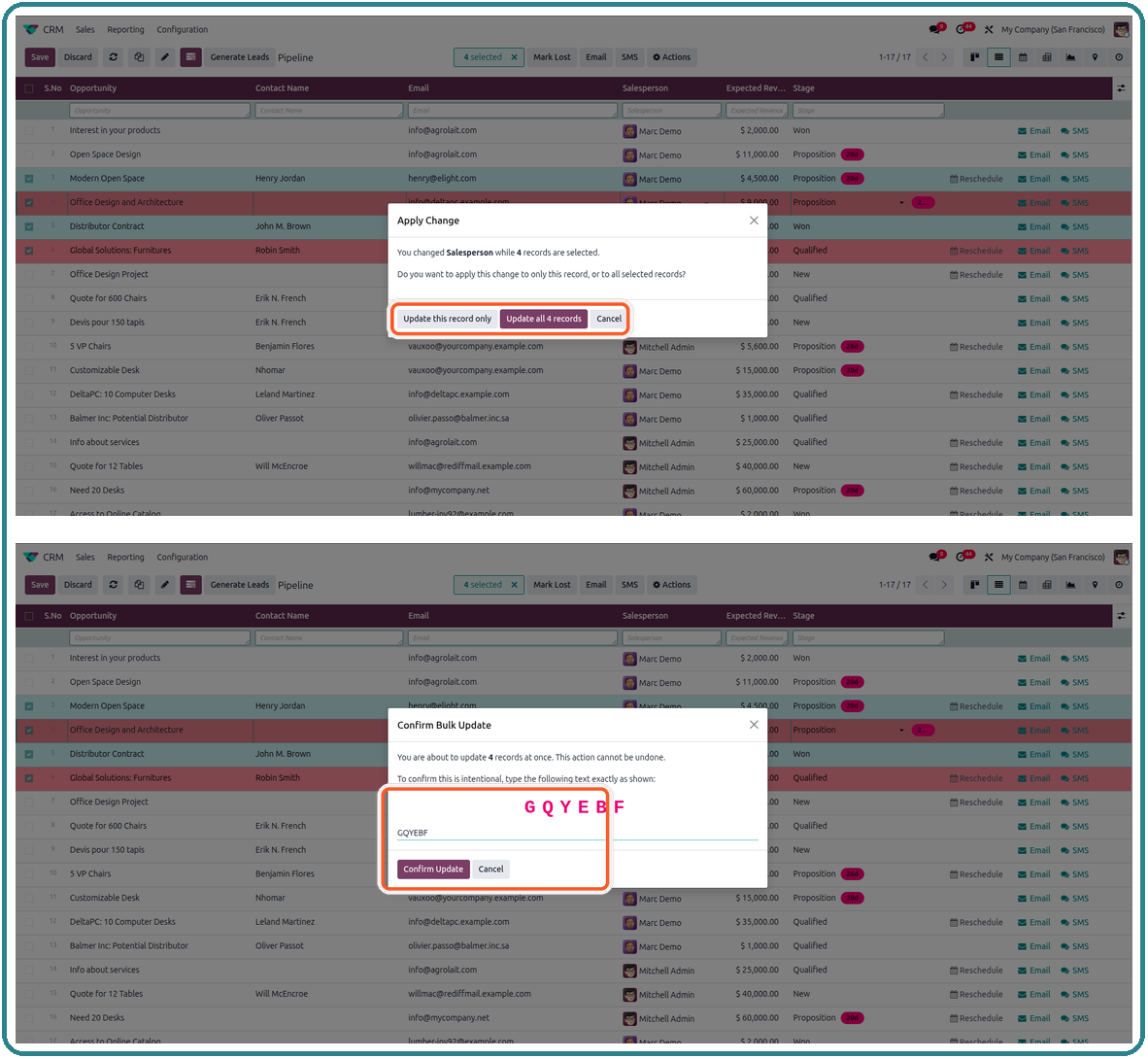
Editing a field across a multi-record selection no longer offers just "apply to all" or "discard". Choose exactly what the change applies to: this record only, or all selected records. For the "all selected" path, retype a randomly generated confirmation code before the bulk update is written, so large mass edits can never happen by accident.
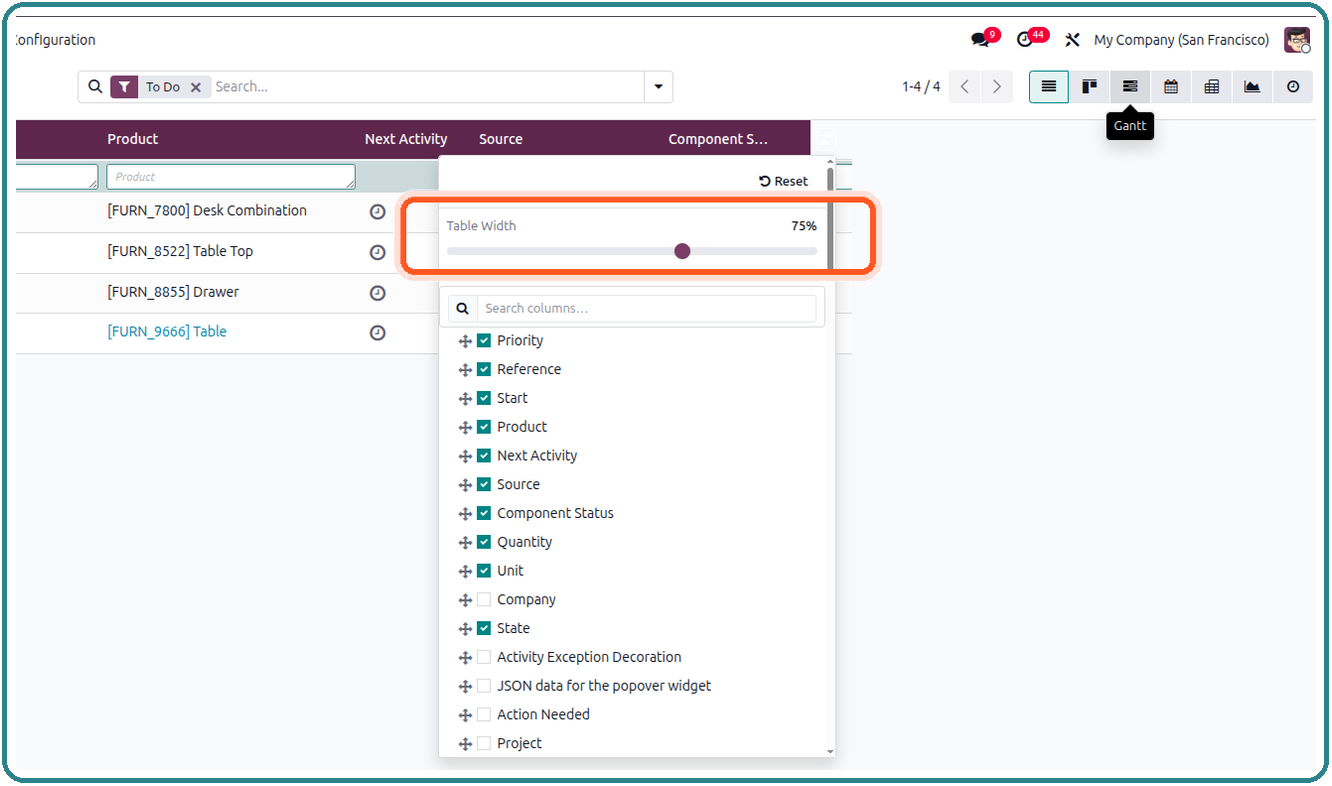
Resize the overall list width to whatever fits your screen, right from the gear (⚙) dropdown. Drag the slider from 30% to 100% and see the table adjust live as you drag; the final width is saved per user on release.

Free 90 Days Support
Ksolves will provide FREE 90 days support for any doubt, queries, and bug fixing (excluding data recovery) or any type of issues related to this module. This is applicable from the date of purchase.


Why Ksolves
Your trusted partner in offering tailored solutions for your unique business vision.
Your trusted partner in offering tailored solutions for your unique business vision.
Client Success
Invest your trust like our elite clientele did!












Development

Certified

Partner

Retention Rate
Share your specific business requirements or challenges with us, and let us craft a custom solution that meets your needs.
Get in Touch


Customization

Development

Share your specific business requirements or challenges with us, and let us craft a custom solution that meets your needs.
Get in Touch
Development
Certified
Partner
Retention Rate
Customization
Development
Free 90 Days Support
Ksolves will provide FREE 90 days support for any doubt, queries, and bug fixing (excluding data recovery) or any type of issues related to this module. This is applicable from the date of purchase.
Frequently Asked Questions
Sometimes you need a quick answer to your question. You can get it right away here.
You know us as the makers of the Odoo "List View Manager".


Free 90 Days Support
Ksolves will provide FREE 90 days support for any doubt, queries, and bug fixing (excluding data recovery) or any type of issues related to this module. This is applicable from the date of purchase.
List View Manager Releases
Every update brings new capabilities. Keep track of the latest features and
enhancements designed to help you manage list views like a pro.
You know us as the makers of the Odoo "List View Manager".
- Migrated to Odoo 20, tracking core's new Owl3 signal-based reactivity (useState/useRef replaced by signal()/proxy()) and the merged ir.access security model.
- Added support for Odoo 20's new grouped `<column>` arch fields (e.g. the combined Product/Description cell on invoice and sales order lines) across column search, the field panel, and copy-cell value.
- Fixed column search losing or misapplying its filter when the searched column was hidden mid-session; hiding a filtered column now clears that filter instead of shifting it onto a neighboring column.
- Added inline validation on Integer/Float/Monetary column search — non-numeric input is now rejected with an on-screen message instead of silently returning an unfiltered list.
- Migrated to Odoo 19 with a fully rebuilt OWL component architecture.
- Added List View Manager support inside One2many & Many2many embedded lists.
- Enhanced the gear (⚙) dropdown with a column search bar and a live table-width slider (30%–100%).
- Extended auto-suggestion search to Char, Text, and Integer fields, plus keyboard shortcuts (Alt+E to edit, Alt+R to reset) and a distinct selected-record highlight color.
- Added a safer bulk-edit flow: choose "this record only" or "all selected", with a type-to-confirm security challenge before mass updates are written.
- Expanded ready-made module integration to 16+ apps: Sales, Purchase, Inventory, Accounting, HR & more. Faster repeat list loads via session-level caching.
- Initial Odoo 19 release: dynamic column management, resize, serial number, read/edit mode, advanced search, and module integrations.
Free 90 Days Support
Ksolves will provide FREE 90 days support for any doubt, queries, and bug fixing (excluding data recovery) or any type of issues related to this module. This is applicable from the date of purchase.
List View Manager



Free 120 Days Support
Get 120 days of FREE support (doubt, queries,
& bug fixing)
on Odoo
applications from the date of purchase. Enhance the functionality of
your business with the Ksolves Odoo experts.
