120 Days Mon - Fri From (10 AM - 10 PM) IST
List View Manager

5 MIN READ

February 11, 2026

Accounting and finance teams operate in a data-heavy environment where every entry/invoice, bill, journal line, or payment has a direct impact on business health and compliance. These teams spend a significant portion of their day reviewing, validating, and tracking financial records.
In Odoo, list views serve as the primary working interface for finance professionals. From checking overdue invoices to validating journal entries, most financial actions begin in list views. However, default list views are designed to be generic and often display more information than required for finance-specific workflows.
When list views are cluttered or poorly structured, finance teams waste valuable time navigating data instead of analyzing it. Optimizing list views helps eliminate noise, improves focus, and ensures that critical financial information is always visible, leading to faster operations and better decision-making.
Finance users are often presented with numerous fields that are not relevant to their daily tasks. Columns unrelated to payments, due dates, or financial status clutter the screen and make it difficult to quickly interpret records. This overload slows down reviews and increases mental fatigue during long working hours.
Scrolling horizontally through long lists or repeatedly adjusting columns becomes a daily frustration for accounting teams. Simple tasks such as identifying unpaid invoices or checking payment statuses take longer than necessary, affecting overall productivity and delaying financial processes.
Different finance roles require different data perspectives. Accountants focus on accuracy and validation, finance managers need summary-level insights, and auditors require traceable and structured data. Default Odoo list views rarely accommodate these differences, forcing everyone to work with the same layout.
When important financial fields are buried among irrelevant columns, critical details such as overdue invoices or mismatched amounts can easily be missed. This increases the likelihood of delayed payments, incorrect postings, and compliance-related issues.
Also Read – How does List View Manager optimize CRM Data Handling?
Optimized list views enable finance teams to immediately identify unpaid invoices, upcoming due dates, and payment statuses. By reducing the need to open individual records, teams can process invoices and payments much faster.
When finance teams see only the most relevant fields, they can review records more carefully and consistently. This focused view minimizes distractions and significantly reduces the chances of human error in financial data handling.
Audits demand clarity, consistency, and traceability. Well-structured list views ensure that financial records are easy to review, filter, and validate, making both internal and external audits smoother and less stressful.
Optimized list views reduce the time spent navigating screens and searching for information. This allows finance professionals to shift their focus from administrative tasks to higher-value activities such as analysis, forecasting, and financial planning.
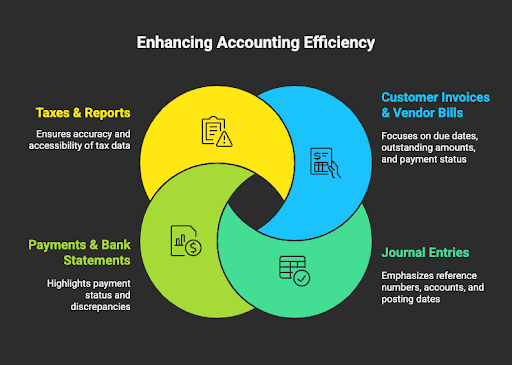
Invoices and bills are among the most frequently accessed records. Optimized list views that highlight due dates, outstanding amounts, payment status, and customer or vendor details enable faster follow-ups and better cash flow control.
Journal entries often involve large volumes of data. Custom list views that emphasize reference numbers, accounts, posting dates, and totals help accounting teams validate entries and perform reconciliations more efficiently.
Clear visibility into payment status/pending, posted, or reconciled is essential for accurate cash management. Optimized list views help teams quickly track payment progress and resolve discrepancies.
Tax-related data must be accurate and easily accessible. Structured list views allow finance teams to quickly locate relevant tax entries, validate reports, and meet compliance deadlines without unnecessary delays.
Read More – Transforming Financial Data Management in Odoo with List View Manager
Removing unnecessary columns helps finance users focus on critical financial data. A cleaner interface improves clarity and reduces decision-making time.
Placing high-priority columns such as amounts, due dates, and statuses at the beginning of the list ensures that important information is visible at a glance.
Designing different list views for accountants, finance managers, and auditors ensures that each role has access to the data they need without clutter or confusion.
Using consistent list view structures across invoices, bills, payments, and journals creates a smoother learning curve and improves usability across the finance ecosystem.
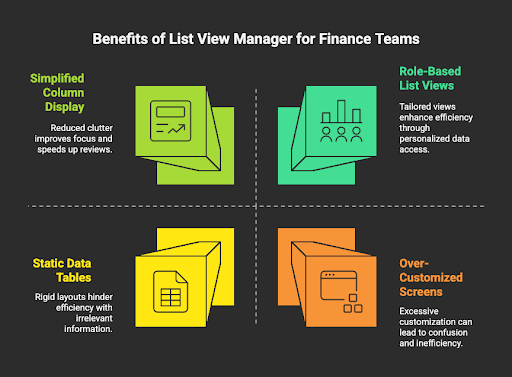
List View Manager empowers accounting and finance teams to customize and control their Odoo list views effortlessly without depending on developers or technical teams. Instead of working with rigid, one-size-fits-all screens, finance users can tailor list views to match their daily workflows and priorities.
By putting control directly in the hands of business users, List View Manager transforms list views from static data tables into efficient, role-driven workspaces that support accuracy, speed, and better financial decision-making.
Finance teams can instantly remove irrelevant columns and display only the fields that matter most, such as due dates, amounts, payment status, and references. This reduces visual noise, improves focus, and makes financial reviews faster and more reliable.
Different finance processes follow different logical sequences. List View Manager allows users to rearrange columns so that information appears in the order it is reviewed, helping teams work more intuitively and efficiently.
Accountants, finance managers, and auditors often need different data perspectives. With List View Manager, teams can create customized list views based on user roles or individual preferences, ensuring everyone sees the most relevant information for their responsibilities.
Consistency across invoices, bills, payments, and journals improves usability and reduces learning time. List View Manager helps maintain standardized, easy-to-read list views across financial modules, resulting in a smoother user experience.
Instead of raising development requests for every layout change, finance teams can manage list views on their own. This reduces reliance on technical teams, speeds up changes, and lowers long-term customization and maintenance costs.
Also Read – Effortless Data Management for Financial Institutions with List View Manager
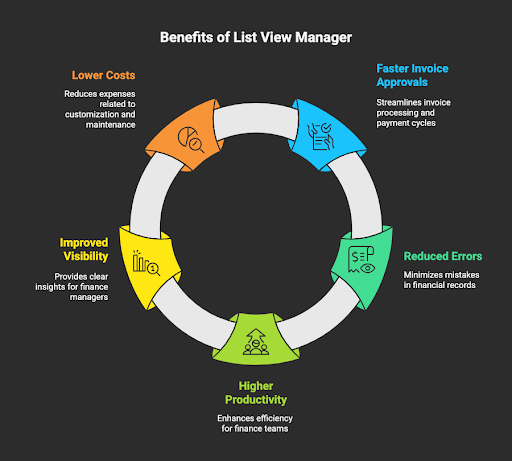
With optimized list views, accounting teams can instantly identify pending, overdue, or high-priority invoices without opening individual records. Clear visibility into due dates, payment status, and amounts enables quicker validations and approvals. As a result, invoices move faster through the approval process, vendor payments are released on time, and overall cash flow improves.
When finance users work with cluttered screens, the risk of overlooking critical details increases. List View Manager removes unnecessary columns and highlights only relevant financial fields, allowing teams to review records with greater focus and accuracy. This structured visibility significantly reduces posting mistakes, mismatched amounts, and missed entries.
By minimizing manual navigation, scrolling, and repeated record checks, List View Manager helps finance teams complete routine tasks more efficiently. Accountants spend less time managing screens and more time on meaningful work such as reconciliations, reporting, and analysis, boosting overall team productivity.
Finance managers need quick, high-level insights to monitor operations effectively. Customized list views provide instant visibility into key metrics such as outstanding invoices, payment statuses, and financial trends. This enables better oversight, faster decision-making, and stronger control over financial processes.
Traditional list view customization often relies on development work, which increases costs and creates maintenance challenges over time. List View Manager eliminates this dependency by allowing teams to manage list views themselves. Businesses save on development efforts, reduce ongoing maintenance expenses, and gain the flexibility to adapt quickly as requirements change.
For accounting and finance teams, operational efficiency depends on how quickly and accurately data can be interpreted. Optimized list views in Odoo remove distractions, reduce errors, and accelerate daily financial operations.
With List View Manager, finance teams always have the right information in front of them, helping them stay accurate, compliant, and productive as the organization grows.