120 Days Mon - Fri From (10 AM - 10 PM) IST
List View Manager

5 MIN READ

February 17, 2026

In any business that relies on Odoo for daily operations, fast and responsive views are essential. Teams need to access data instantly, whether they are checking sales numbers, updating inventory, or reviewing customer records. However, when Odoo views start loading slowly, the impact is immediate. Productivity drops, takes longer, and users become frustrated with constant delays. These slowdowns not only affect individual workflows but also create bottlenecks across departments, impacting overall business efficiency. The root cause is often small but critical mistakes made while configuring or designing Odoo views.
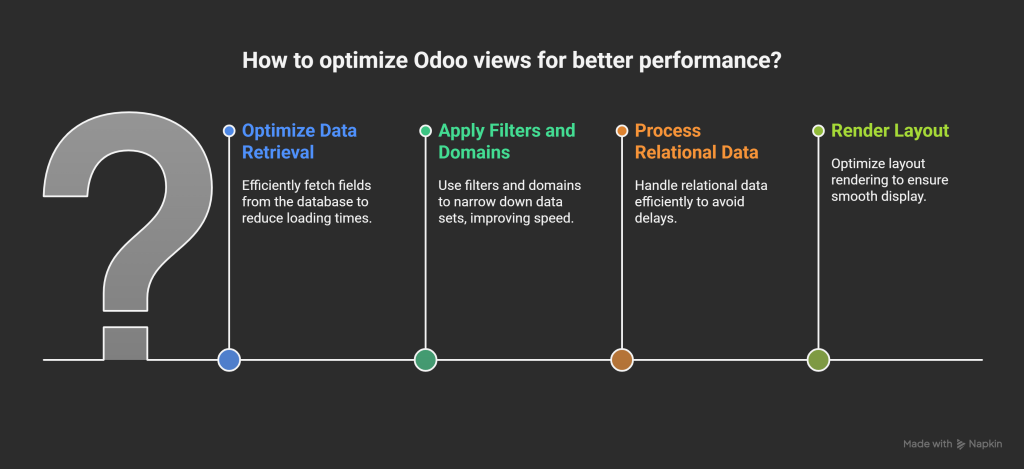
Odoo provides multiple view types such as List (Tree), Form, Kanban, Graph, Calendar, and Pivot views. Each serves a different purpose, but they all rely on how efficiently the system retrieves and displays data. When a user opens a view, Odoo fetches fields from the database, applies filters or domains, processes relational data, and renders the layout. If any part of this process is overloaded, the view becomes slow. That’s why optimization is not just a technical detail, it’s essential for maintaining a smooth user experience.
Also Read – Transforming Financial Data Management in Odoo with List View Manager
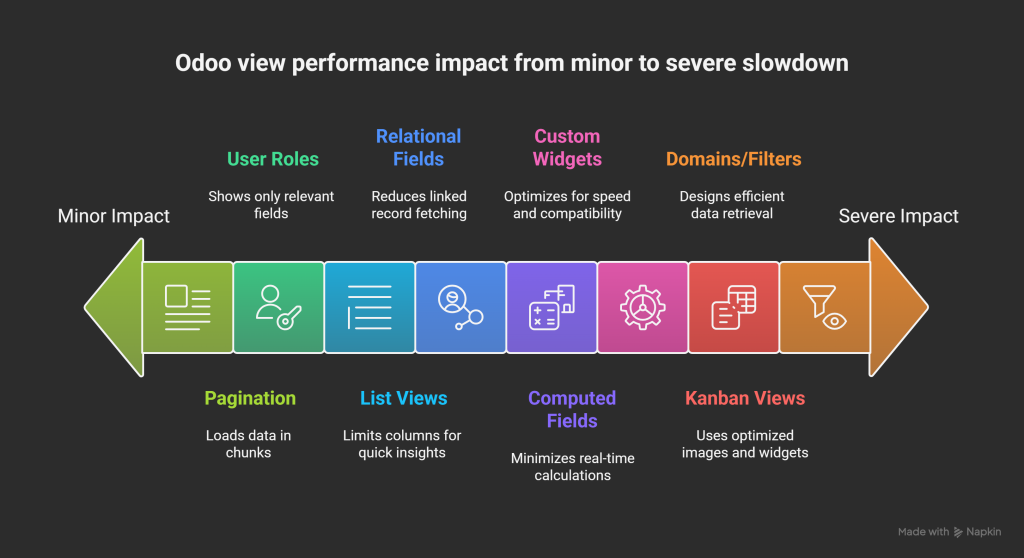
List views are meant to offer quick insights, but adding too many columns slows them down. Each additional field increases the data load and affects rendering speed. Keeping only essential fields ensures faster performance and cleaner navigation.
Relational fields require Odoo to fetch linked records, which adds extra processing time. If a list view contains multiple Many2one or Many2many fields, the system must run several queries, leading to significant delays especially in large databases.
Also Read: How an E-commerce Company Achieved 60% Faster Data Access with List View Manager for Odoo
Domains and filters determine which records appear in a view. When these conditions are too complex or inefficiently designed, Odoo must perform heavy computation to fetch results. This can slow down view loading and impact the overall performance of the module.
Computed fields are powerful, but they run calculations in real-time. When multiple computed fields are placed in a single view, Odoo has to execute each computation before displaying the records. This additional load can significantly delay view rendering.
Custom widgets often look attractive, but they may not be optimized for speed. They can slow down rendering, create compatibility issues, and affect performance especially when combined with dynamic fields or large datasets.
Showing every field to every user leads to unnecessary clutter and longer load times. Views should be customized based on user roles so that individuals only see what they need. This reduces both visual complexity and system workload.
Also Read: How does List View Manager optimize CRM Data Handling?
When a view loads hundreds or thousands of records at once, it strains both the server and the user’s browser. Proper pagination ensures data loads in manageable chunks, preventing lag and improving responsiveness.
Kanban views are highly visual, but large images or overloaded cards slow down rendering. High-resolution graphics, too many fields, or complex widgets can cause noticeable delays, especially for users on slower devices or networks.
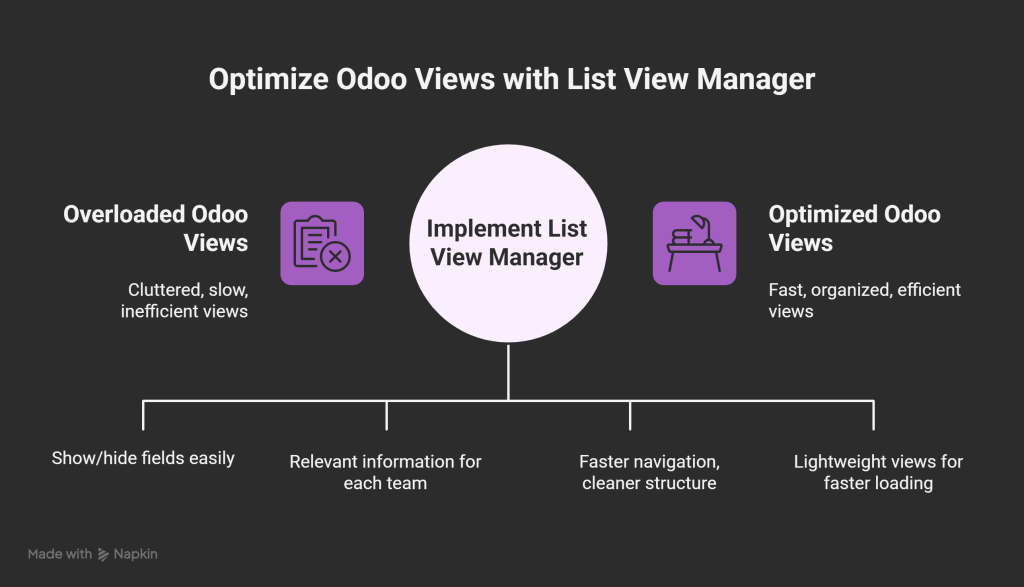
After understanding these common mistakes, the next step is implementing a practical, user-friendly solution. This is where List View Manager becomes essential. It is an Odoo application designed to help users customize and optimize list/tree views without writing a single line of code.
With List View Manager, users can avoid overloaded views by hiding or showing fields with ease. The app supports role-based field visibility, ensuring that each team sees only the information relevant to them. Fields can be reorganized using drag-and-drop, allowing faster navigation and a cleaner structure across modules.
The tool also helps optimize layout performance by keeping views lightweight. Users can create personalized list views tailored to their workflows without affecting global Odoo settings or other users. This saves administrators a significant amount of time and ensures each department, from CRM and Sales to Inventory and Accounts gets a fast, organized, and efficient view.
In short, List View Manager enhances productivity by reducing clutter, improving performance, and enabling teams to work more efficiently with well-optimized Odoo views.
List View Manager is the easiest way to achieve it.
Slow Odoo views are often the result of simple yet impactful mistakes. By optimizing fields, reducing relational load, improving domains, and customizing views according to user roles, businesses can experience dramatically faster performance. For organizations looking for an effortless and powerful way to optimize Odoo list views, List View Manager offers the most practical solution.