
120 Days
Free Support
Free
Lifetime Update
Free
Installation
120 Days
Free Support
Free
Lifetime Update
Free
Installation




Book Your Personalised Demo Right Away






See it in action on your own manuals
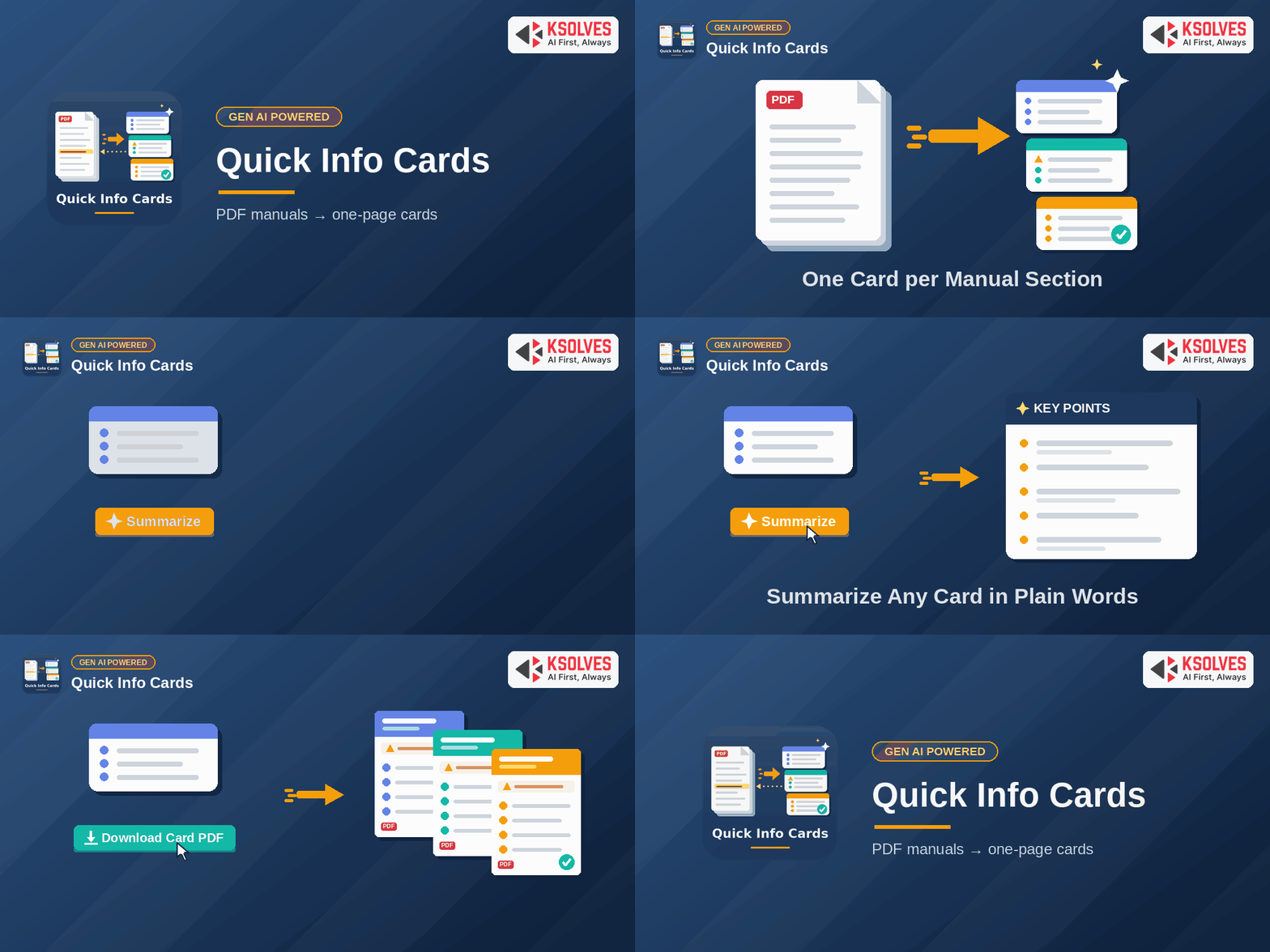
One Card per Task or Topic
The AI reads the manual's outline and content and decides the cards: a procedure with its
warnings and notes stays one card, and a new card starts where new content starts —
each one sized to read on a page.
From the Manual Only
Steps or key points, the safety warning first and the tools with their specifications —
written from the manual alone. A question the manual does not answer gets no card,
and the reason is shown: nothing is made up.
Opens the Exact Source Line
Every step cites its page, and the card shows its own part of the original PDF. One
click opens the full manual on that line, highlighted — easy to check, easy
to trust.
Automatic on PDF Upload
Upload a manual on eLearning content or a maintenance request and its cards are made
in the background. Existing manuals are processed too, a few per run, so the AI quota
is never used up at once.
Any AI Provider, Any Model
Anthropic Claude, OpenAI or Google Gemini with your own key — every model the key can
use, newer ones included. The cheapest model is pre-selected and asked for the least
thinking, so a whole manual costs cents.
Print-Ready Cards & Summaries
Print any cards as one A4 page each, ready to post at the workstation, and turn any
card into plain-word key points with Summarize — every number and warning kept.
Standout Features Of
Quick Info Cards
Section-Sized Cards
Follows the manual's numbering
Source-Line Linked
Page per step, opens the line
Automatic on Upload
Existing manuals included
Claude · OpenAI · Gemini
Any model, cheapest by default
Plain-Word Summaries
Key points, printable
Cards Reused for Free
Recurring jobs, copied courses
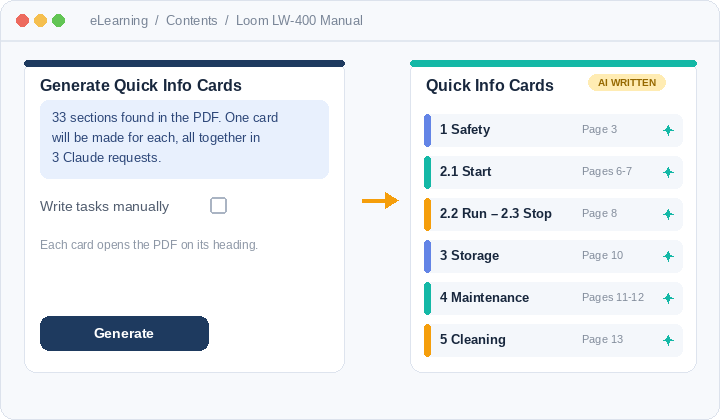
Upload the manual. The cards write themselves.
Quick Info Cards reads the manual's headings, the AI decides from the content which
ones make each card and writes them — one AI request for a usual manual — automatically on upload, or from the Generate
button. Generating again only makes the cards that are missing, and a section the AI
could not write is built from the manual's own sentences, never left out.
Spotlight
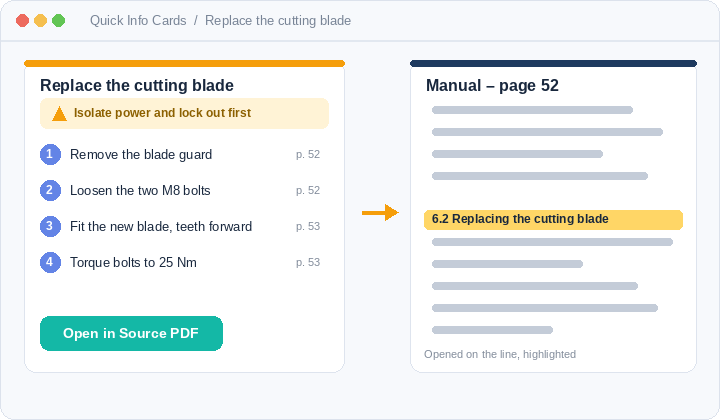
Every Step Cites Its Page — One Click to the Source Line
Shop-floor teams and auditors need to know where an instruction comes from. Quick Info Cards
keeps every card tied to the official manual.
- The manual's own page: the card form shows its exact part of the original PDF, cut at its heading, with tables and pictures.
- Open in Source PDF: the full manual opens on the card's page with its first line highlighted — from the form or the list.
- New version of the manual: existing cards are placed in the new PDF automatically, on their new page and line.
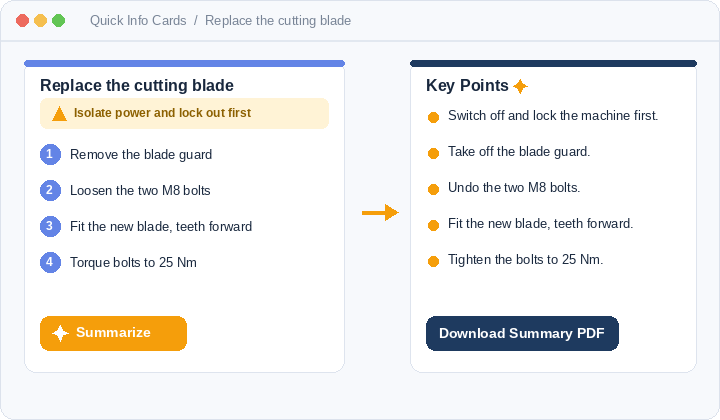
Summarize any card in plain words.
One click on Summarize turns the card's part of the
manual into short key points in plain, everyday words — every number, setting and
warning kept, nothing added. Download Summary PDF
prints them for anyone who needs the quick version.
Download & Print
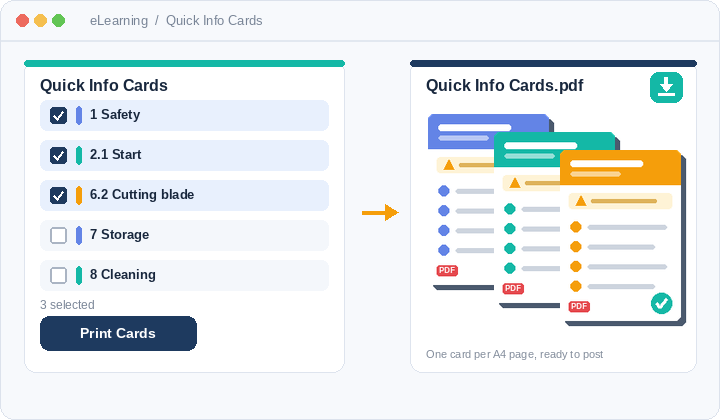
One Card per A4 Page, Ready for the Workstation
- Download Card PDF: saves the part of the manual the card shows, named after the card.
- Print Cards: select any cards in the list and get one PDF, one card per A4 page.
- Maintenance cards too: the same Download Card PDF, Summarize and Print Cards on every maintenance request's cards.
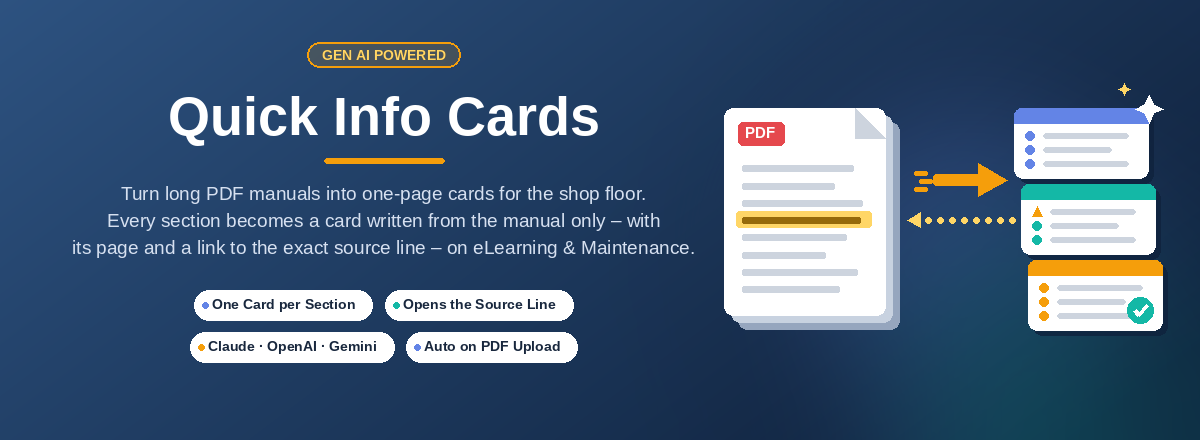
Quick Info Cards turns the PDF manuals already stored in Odoo — on eLearning document
content and on maintenance requests' Instructions tab — into short, printable
quick-reference cards for operators, trainees and technicians. Each card covers one
section of the manual, is written by the AI provider of your choice from the manual
only, cites the page of every step and opens the source PDF on its line. It adds no
upload fields and does not change how eLearning or Maintenance work; cards appear
next to the content and requests they belong to, under standard Odoo security.
12+ Years
Building and supporting Odoo
Odoo Gold Partner
Official Odoo implementation partner
CMMI Level 3
Appraised development process
Ksolves supports this module directly — configuration of the AI provider and
model, tuning to your manuals, and any bug fixes or enhancements. Reach out any time at
[email protected]
and the team that built it will pick it up. See the Free 90 Days Support
section further down this page for the details of what's covered.
No. Quick Info Cards reads the PDF already attached to an eLearning document content or to a maintenance
request's Instructions tab. Uploading or replacing that PDF is all it takes.
The one you choose in Settings: Anthropic Claude, OpenAI or Google Gemini, with your own API key.
Every model the key can use is listed, newer models included, and any model id can be typed
in. The cheapest model is pre-selected.
Cards are written from the manual only. Every step cites its page and the card opens the source
line, so it is quick to check. A question the manual does not answer gets no card, and the
reason is shown.
Yes — the AI reads the page images. Card quality follows the scan quality; a PDF with selectable
text gives the best cards.
Training Managers generate Quick Info Cards and HR users read them. Equipment Managers generate
maintenance Quick Info Cards; employees only see the cards of the maintenance requests they own,
follow or are responsible for.
No. A request, or a copied course, with the very same PDF gets copies of the existing cards —
no AI request is made.
Release 19.0.1.0.0
19th October, 2026
Current
- Initial release: one quick-reference card per manual section on eLearning content and maintenance requests
- Typed tasks and questions, Summarize into plain-word key points, Print Cards (one A4 card per page)
- Every card shows its part of the manual and opens the source PDF on its line
- Automatic generation on PDF upload; Anthropic Claude, OpenAI and Google Gemini with any model
Permission-Gated
Training Managers and Equipment Managers generate cards; employees see only
the cards of their own maintenance requests.
Source-Linked
Every step cites its page and every card opens the official manual on its
line — nothing is made up.
Non-Intrusive
Purely additive on top of eLearning & Maintenance — no new upload
fields, no change to existing flows or reports.


Free 90 Days Support
Ksolves will provide free 90-day support for any doubt, queries, and bug
fixing (excluding data recovery) or any type of issue related to this
module. This is applicable from the date of purchase.
Note
Extensively Tested on Odoo Vanilla with Ubuntu OS
Ksolves Suggested Apps









Ksolves Odoo Services
Need help or a custom enhancement?
Reach out to the Ksolves team and we'll take it from there.
[email protected]
© Ksolves India Ltd. ·
www.ksolves.com

Free 120 Days Support
Get 120 days of FREE support (doubt, queries,
& bug fixing)
on Odoo
applications from the date of purchase. Enhance the functionality of
your business with the Ksolves Odoo experts.
