




Book Your Personalised Demo Right Away
Scan the QR code below to connect with our team instantly.

Odoo LinkedIn Sign In
Let your team and portal users sign in with one click using their LinkedIn account. Fully secure, server-side authentication, no passwords to manage, no accounts to create manually.
Free Installation
We handle setup so you can focus on your business.
24×7 Assistance
Round-the-clock expert support whenever you need it.
Easy Configuration
Up and running in minutes, no code changes needed.
Free 90 Days Support
Dedicated support for 90 days post purchase.
Built for Every Odoo Business
Whether you run a portal, internal ERP, or B2B platform, LinkedIn Sign In removes the authentication barrier.
B2B Portals
Vendors and partners already logged into LinkedIn click once and land on your Odoo portal, no separate password to create or remember.
Recruitment Portals
Job applicants coming from a LinkedIn job post sign in instantly, their name and email are filled automatically, reducing form friction.
Returning Users
Existing Odoo users who already have an account can sign in with LinkedIn, the system matches them by email and links their account automatically.
Admin Control
Admins configure LinkedIn Sign In from Settings in minutes, enable the integration, enter credentials, set the default user type, and test the connection.
One Click. Users Are In.
A "Sign in with LinkedIn" button is automatically added to the Odoo login page the moment the integration is enabled, no template changes needed.
- or -
What users see
The LinkedIn sign-in button appears automatically below the standard login form. Users click it, approve on LinkedIn, and land directly in Odoo, no password needed, no account creation form.
Both user types can authenticate with the same button.
If the LinkedIn email matches an Odoo account, it links silently.
The button is added automatically, no manual changes to your login page needed.
Everything You Need, Nothing You Don't
A focused, well-engineered integration that handles the complete sign-in flow securely on your server.
Enterprise-Grade Security
Every sign-in is protected against forged requests. The entire authentication happens on the server, your Client ID and Secret are never exposed to the browser. Credentials are stored securely in Odoo's database, never in any file or code. Only the minimum required data (name, email, profile picture) is ever requested from LinkedIn.
Smart 3-Step User Provisioning
Every LinkedIn sign-in follows a reliable path: returning users are recognised instantly, existing Odoo users are matched and linked by email, and brand-new users are created automatically, no duplicates, no stale records, no admin intervention needed.
Automatic Profile Data Import
When a new user signs in with LinkedIn, their full name and email are automatically populated in Odoo, no manual entry needed. Their LinkedIn profile picture is also imported and set as their Odoo avatar. If the picture is unavailable, sign-in still completes without interruption.
Admin Settings Panel
Everything is controlled from Settings → LinkedIn Sign In. Enable or disable the integration, enter Client ID and Client Secret, choose whether new sign-ups become Portal or Internal users, and copy the auto-generated Redirect URI, all without editing any file.
Complete Login Activity Log
Every sign-in, account link, new user creation, and failure is recorded in the Odoo server log with the user's name and timestamp. Your team has a full, reliable trail of all LinkedIn login activity for auditing and troubleshooting.
Test Connection Button
Verify that your Odoo server can reach LinkedIn before going live. Click Test Connection in Settings, a green notification confirms everything is working, and a red one shows the exact issue if something is wrong. No guesswork before launch.
Set Up in Under 10 Minutes
All configuration lives in Odoo Settings under the LinkedIn Sign In section. No files to edit, no server restarts needed.
Smart 3-Step Decision Tree
Every LinkedIn sign-in follows the same reliable path, no duplicate accounts, no stale records, no admin intervention required.
Returning User
Already signed in before? The system recognises them instantly and logs them in, no duplicate account created, no extra steps.
Email Match
An existing Odoo user is matched by login or email field (case-insensitive). LinkedIn is linked to their existing account automatically, no duplicate, no confusion.
New User Created
No match found, a new Odoo user is created as Portal or Internal based on your Settings choice, with LinkedIn profile picture imported.
Built Secure by Default
Every step of the sign-in process is protected out of the box, no extra configuration required.
Forged Request Protection
A unique security token is generated for every sign-in attempt and verified on return. Any tampered or replayed request is rejected immediately.
Server-Side Exchange
The entire sign-in handshake happens on your Odoo server. Your Client ID and Secret are never exposed to the user's browser at any point.
Secure Credential Storage
Client ID and Secret are stored securely inside Odoo's own database, never written to any file, code, or log output.
Full Audit Trail
Every login, link, creation, and failure is logged to the Odoo server log with user ID, login, and event type for complete traceability.
Configure in Two Parts
Create a LinkedIn App to get your credentials, then enter them in Odoo Settings. Total time: under 10 minutes.
Create a LinkedIn App
Open the LinkedIn Developer Portal
Go to https://www.linkedin.com/developers/apps and sign in with your LinkedIn account. Click Create App.
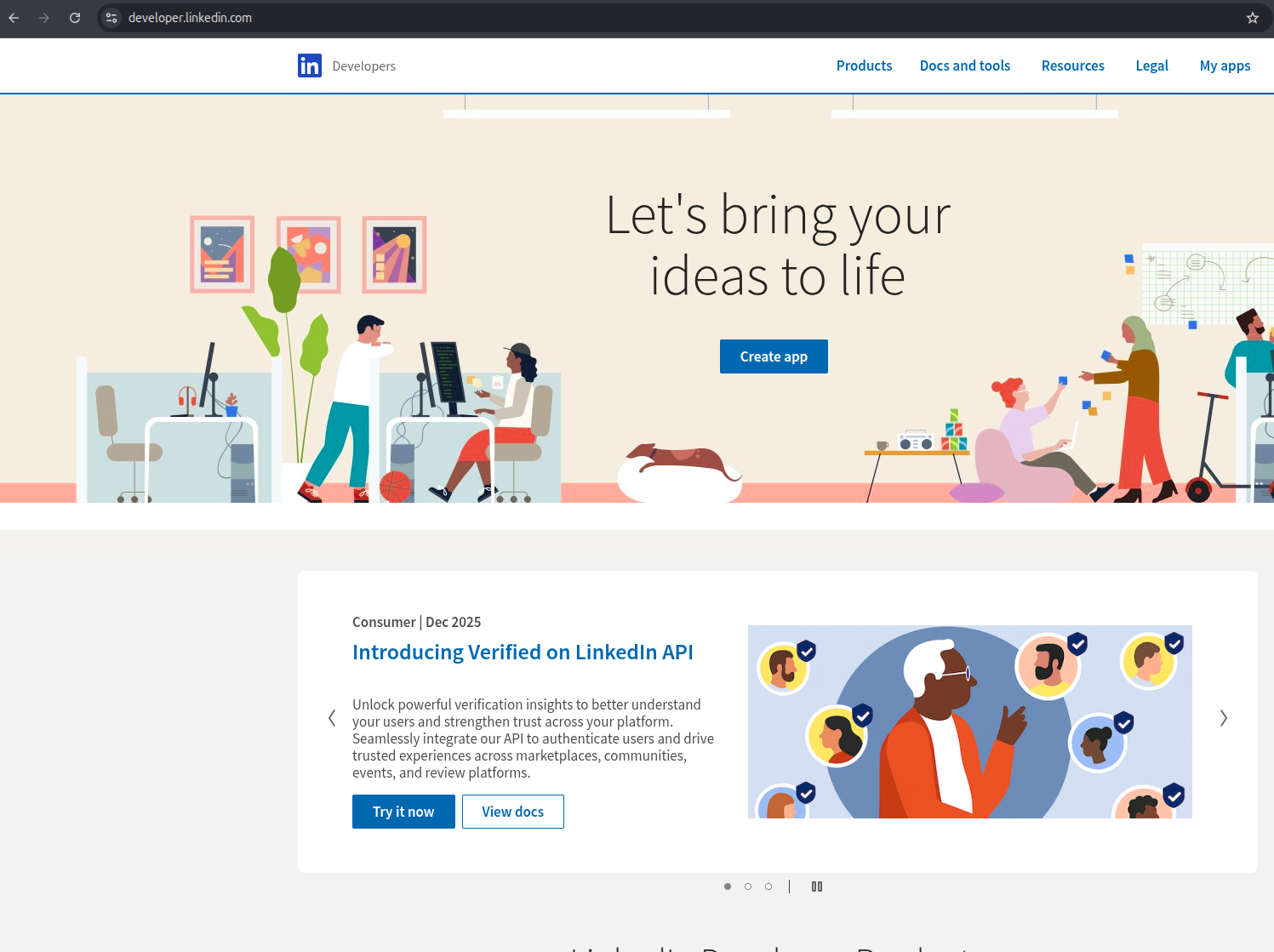
LinkedIn Developer Portal, click "Create App" to begin
Fill in the App Details
Enter your App Name, select a LinkedIn Page (company page), upload a logo, enter your Privacy Policy URL, and accept the Legal Agreement. Click Create App.
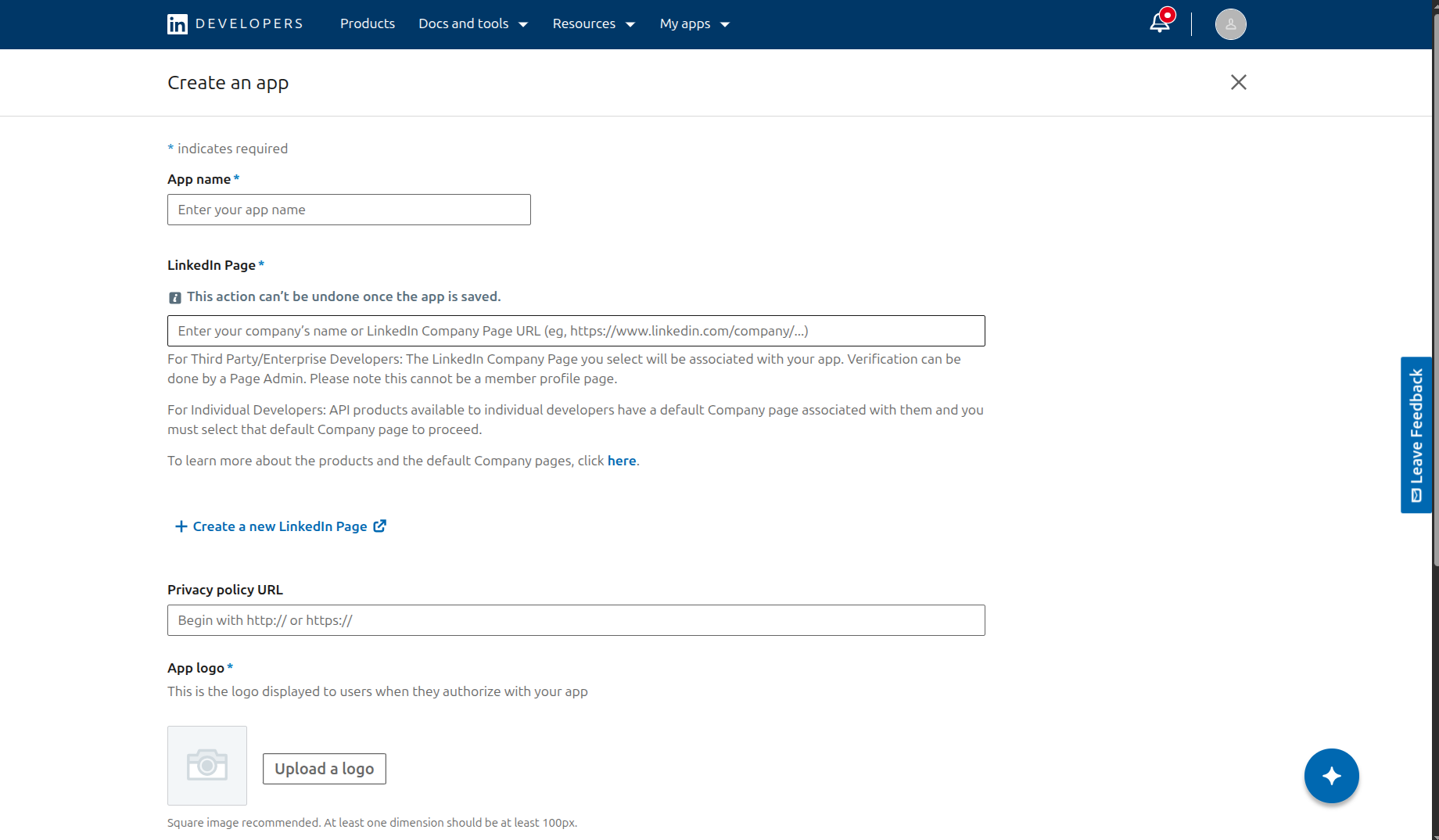
Fill in App Name, LinkedIn Page, logo, Privacy Policy URL, and accept the Legal Agreement
Add the OpenID Connect Product
On your App's Products tab, request access to Sign In with LinkedIn using OpenID Connect. This is the product that allows users to sign in with their LinkedIn account and share their name, email, and profile picture.
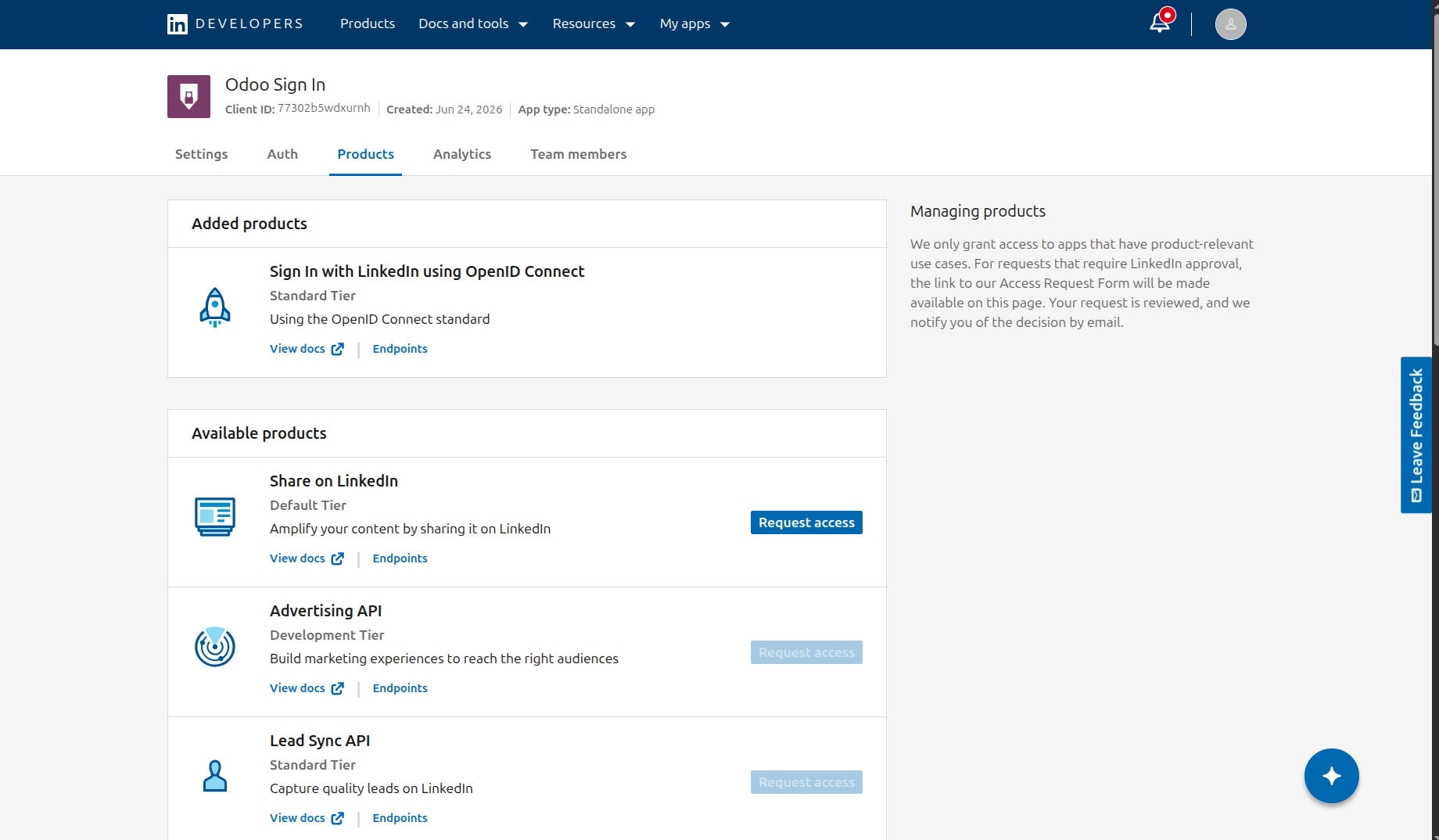
Request the "Sign In with LinkedIn using OpenID Connect" product
Add Redirect URI & Copy Credentials
Go to the Auth tab of your App. Under Authorized redirect URLs, paste your Odoo callback URI, it follows the pattern https://yourodoo.com/auth/linkedin/callback. You can also copy the exact value from Odoo → Settings → LinkedIn Sign In → Redirect URI once the module is installed. Then copy the Client ID and Client Secret, you'll need them in Part B.
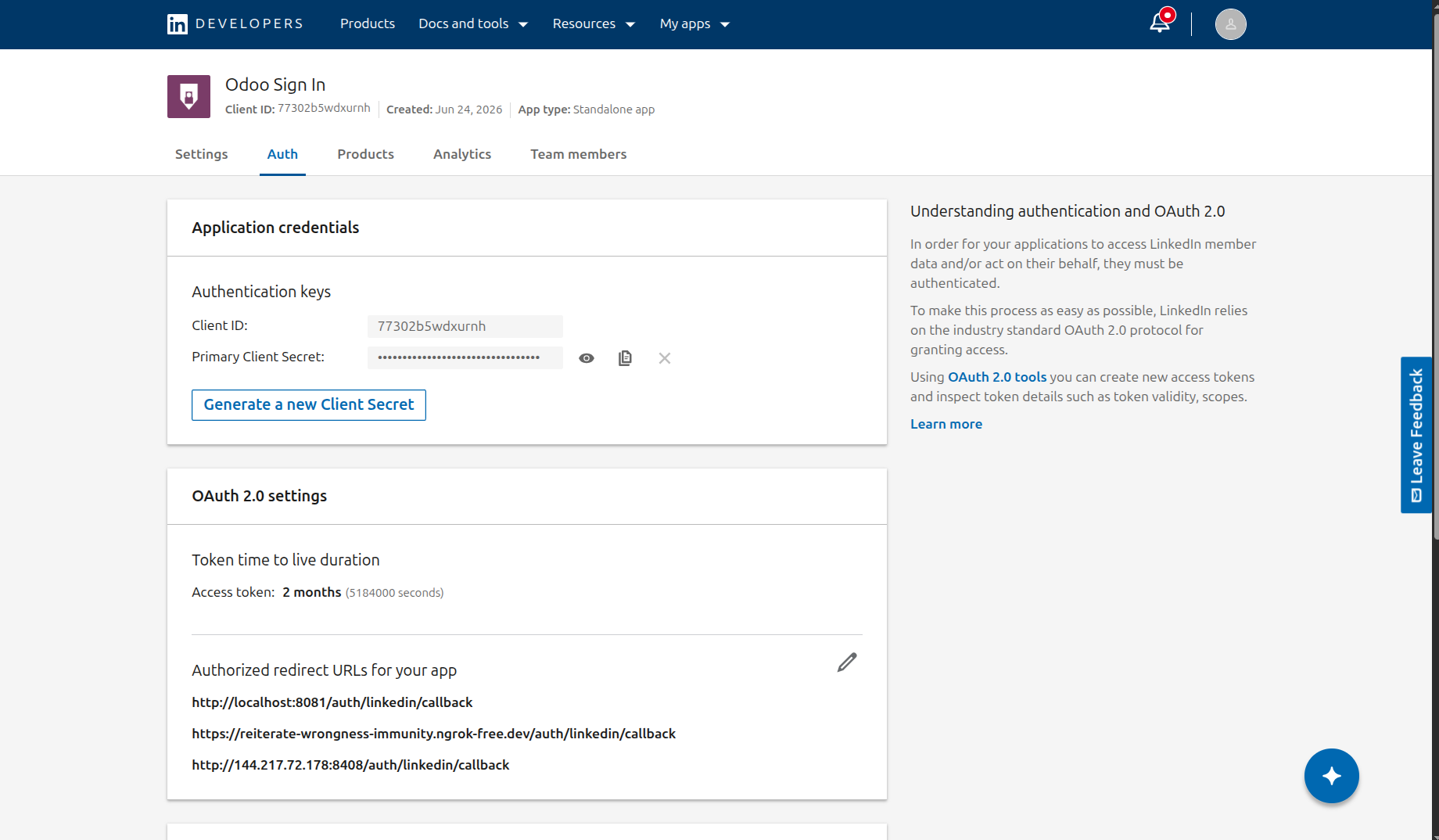
Add the redirect URI and copy your Client ID and Client Secret from the Auth tab
Configure Odoo Settings
Install, Enable & Enter Credentials
Install KS LinkedIn Sign In from Odoo Apps. Go to Settings → LinkedIn Sign In, tick Enable LinkedIn Login, paste the Client ID and Client Secret from Part A, and choose the Default User Type for new sign-ups. The Redirect URI is filled automatically, copy it and confirm it matches what you registered in the LinkedIn Developer Portal.
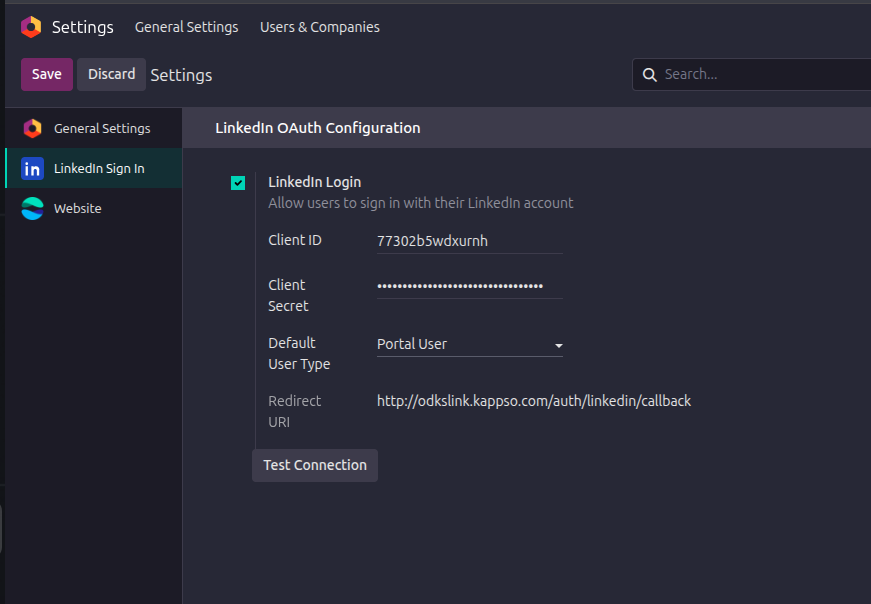
Enable the toggle, paste credentials, and copy the auto-filled Redirect URI
Save and Test Connection
Click Save, then click Test Connection. A green notification confirms LinkedIn is reachable from your server. A red notification shows the exact issue if something is wrong.
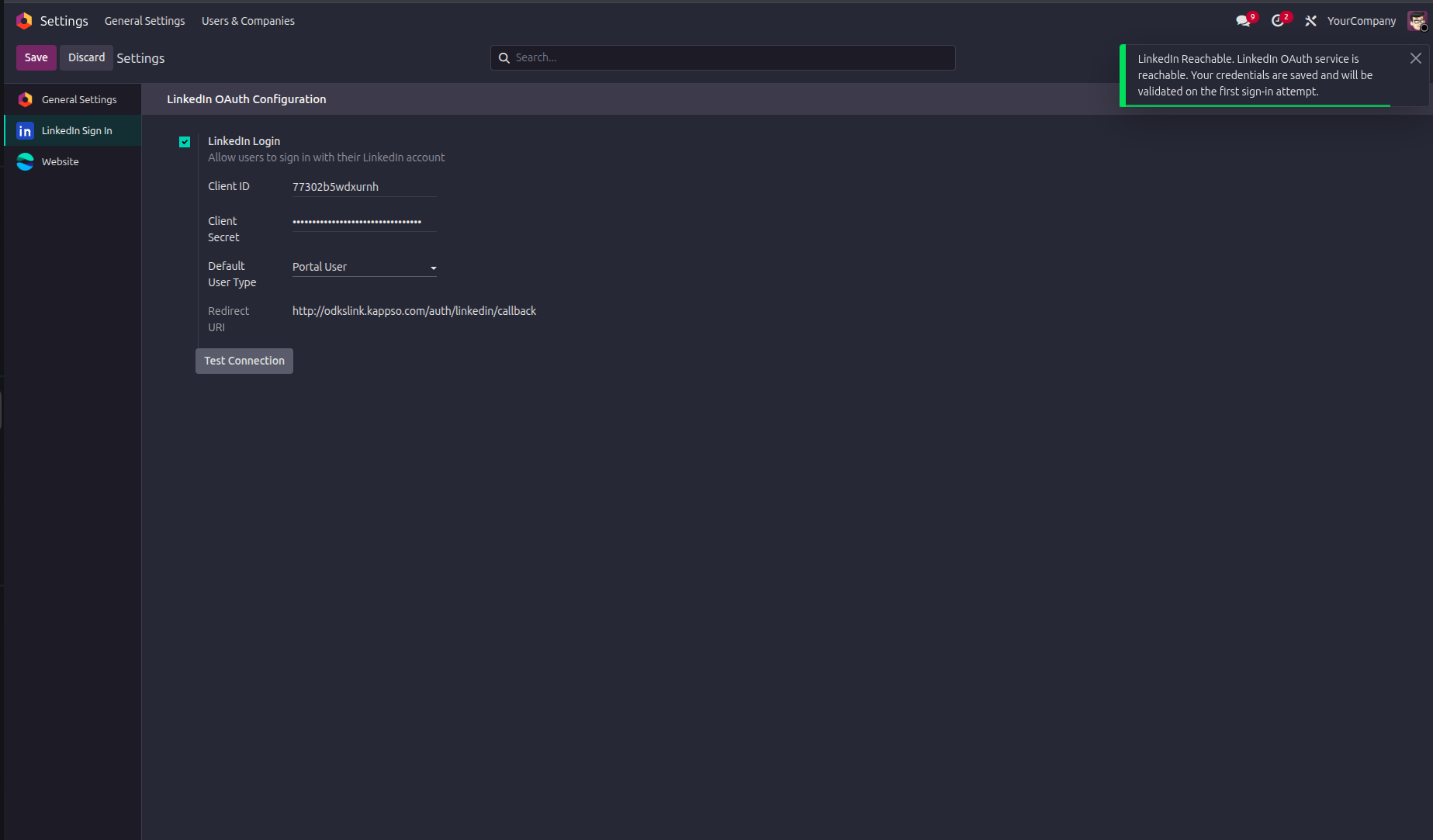
Test Connection shows a green notification when LinkedIn is reachable
Verify the Login Button
Open a private/incognito browser, go to your Odoo login page, and confirm the Sign in with LinkedIn button appears. Click it to do a quick test, you should be logged in and land on the Odoo dashboard.
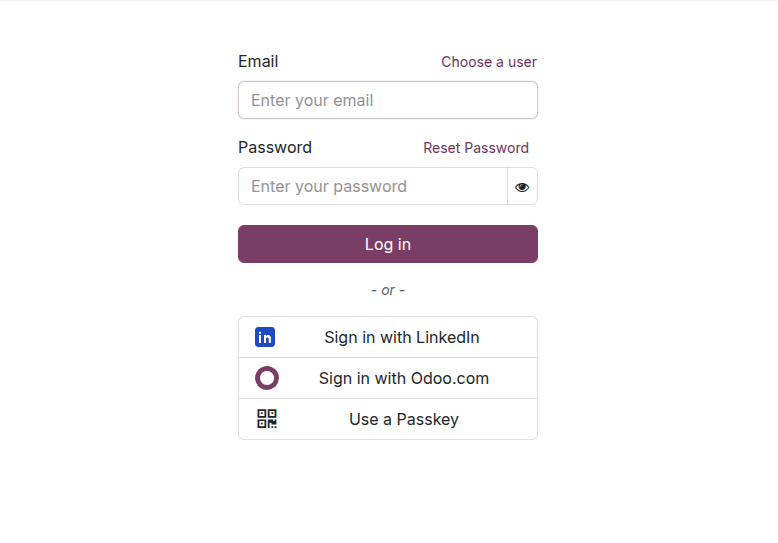
The Sign in with LinkedIn button on the Odoo login page
Frequently Asked Questions
Release History
- One-click Sign in with LinkedIn button on the Odoo login page
- Smart user matching: existing accounts linked automatically, new users created on first sign-in
- Admin Settings panel with toggle, credentials, default user type, and Test Connection button
- Compatible with Odoo 19 Community, Enterprise, and Odoo.sh
Trusted by 3000+ Odoo Customers Worldwide
We're Here to Help
Our team will walk you through the module and answer all your questions.
Phone
1800 121 0218Mon–Fri from 9am to 6:30pm.
© 2026 Ksolves India Ltd. All rights reserved.
Free 120 Days Support
Get 120 days of FREE support (doubt, queries,
& bug fixing)
on Odoo
applications from the date of purchase. Enhance the functionality of
your business with the Ksolves Odoo experts.
