





Book Your Personalised Demo Right Away

 Connect With Sales
Agent
Connect With Sales
Agent

 Connect Via WhatsApp

 Book A Meeting
Ksolves — Your one-stop solution
We are available 24/7 for your service. Contact us today!



 sales@ksolves.com
 1800 121 0218
Ksolves SaaS Lite
Run your own multi-tenant Odoo hosting service. Every customer gets their own isolated Odoo database on their own subdomain — bought from your storefront, built while they watch, and managed from their own portal.
What makes Ksolves SaaS Lite unique
Sell Odoo as a service without building the platform yourself.
Everything a hosted-Odoo business needs, in one app
Storefront
Customers pick a plan, claim a subdomain and pay. No sales call, no manual setup.
Isolated, not shared
One Odoo database per customer, at their own address.
Self-service portal
Back up, restore, resize the team, pay invoices, cancel — without a ticket.
Billing built in
Monthly or annual plans, seats priced per unit, invoiced and collected automatically.
What your customers get
Every screenshot below is the running product.
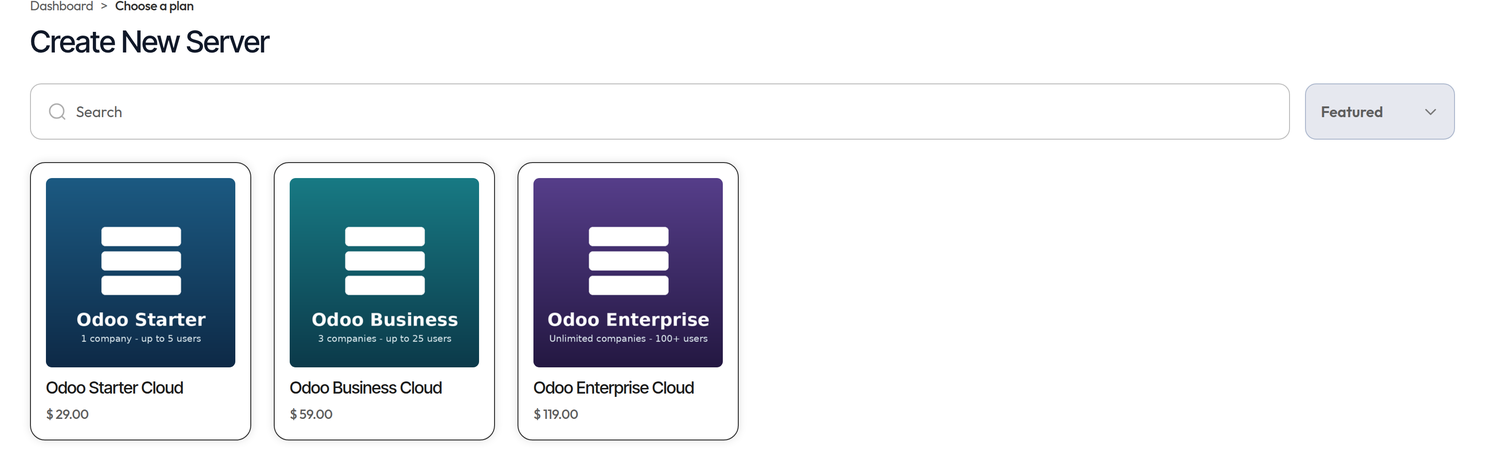
Your plans, sold as a shop
Hosting plans listed as cards, with search and sorting. Monthly and yearly are priced independently, so the annual rate is whatever you decide it is worth.
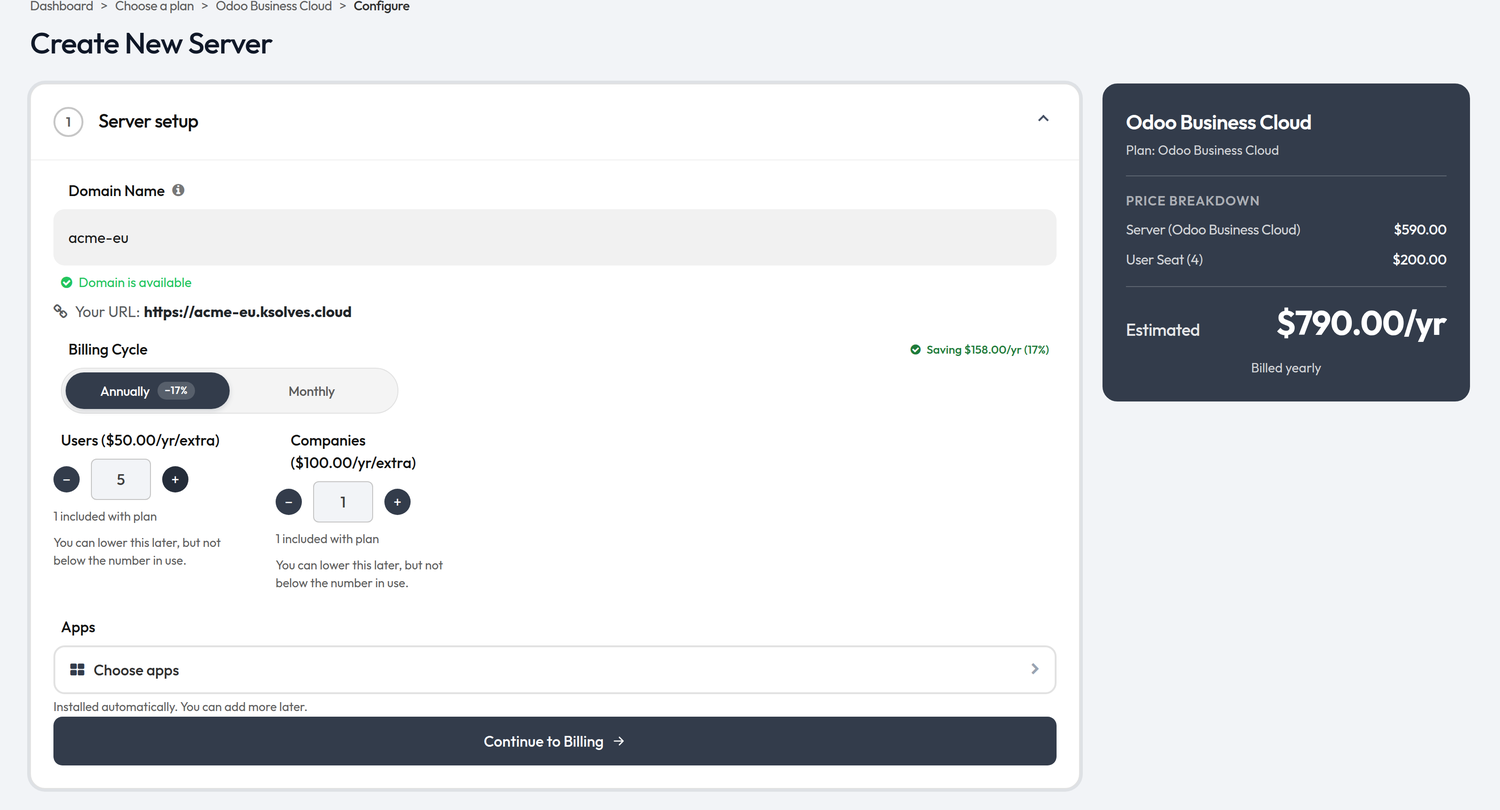
Pick a name and watch the price move
- ✓Domain availability is checked as they type, with the final URL previewed.
- ✓The annual saving is calculated for their exact configuration, seats included.
- ✓Seats are added with steppers and priced live in the summary panel.
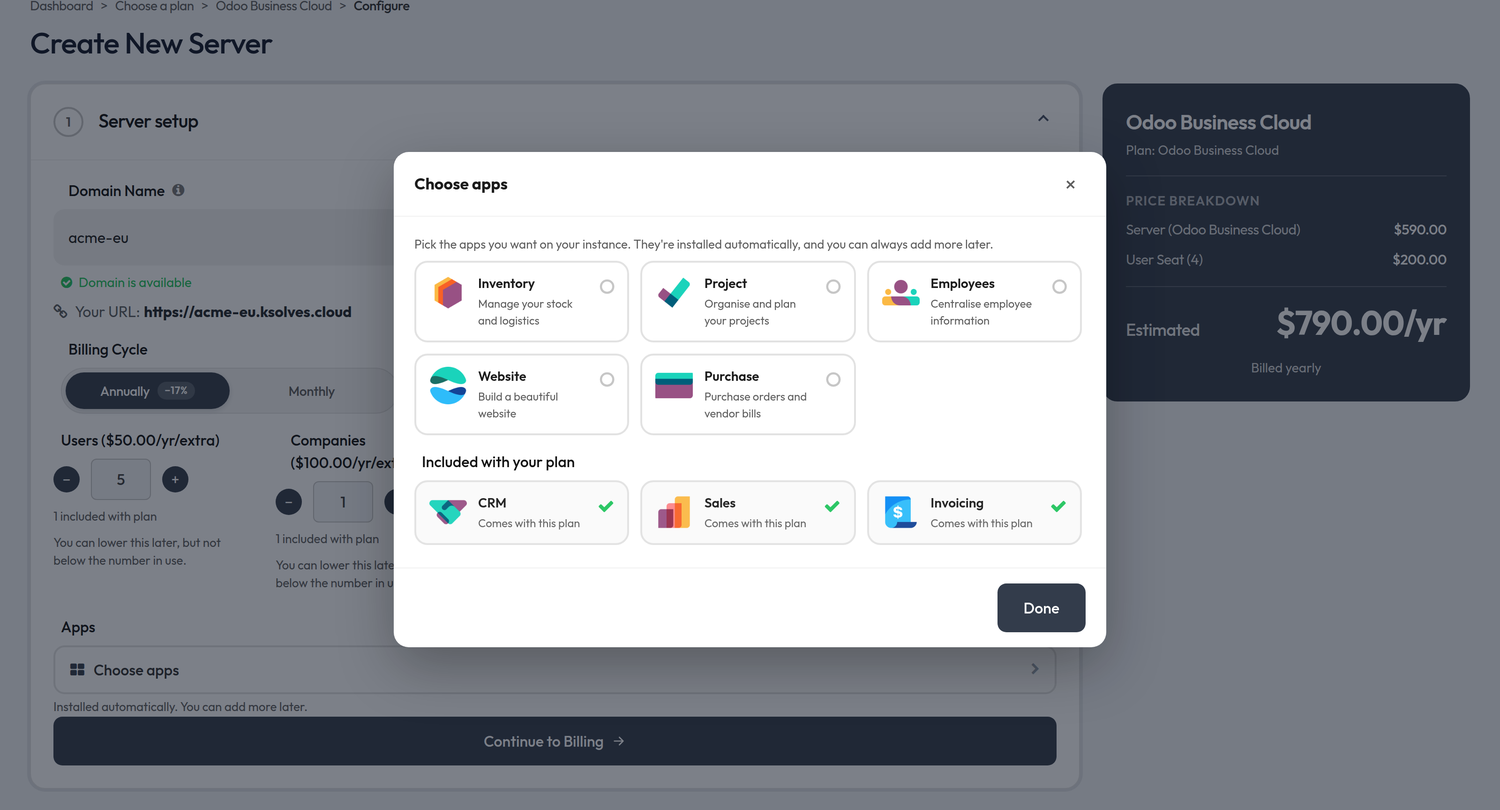
Apps are chosen at checkout
Customers tick the apps they want and they arrive installed with the server. More can be added later from the portal.
Real-time progress
Setup, backups, restores and deletions report their progress live on the customer's page.

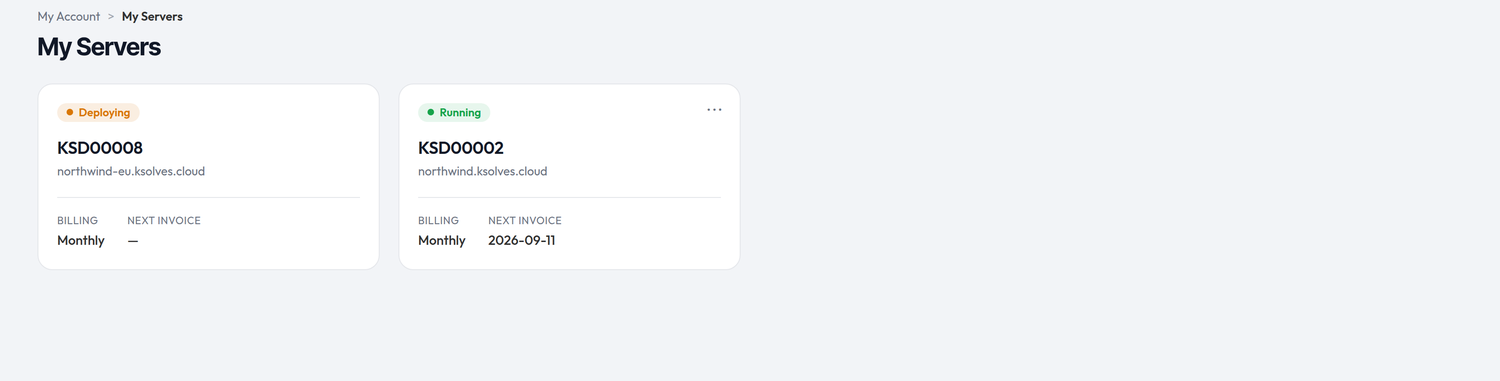
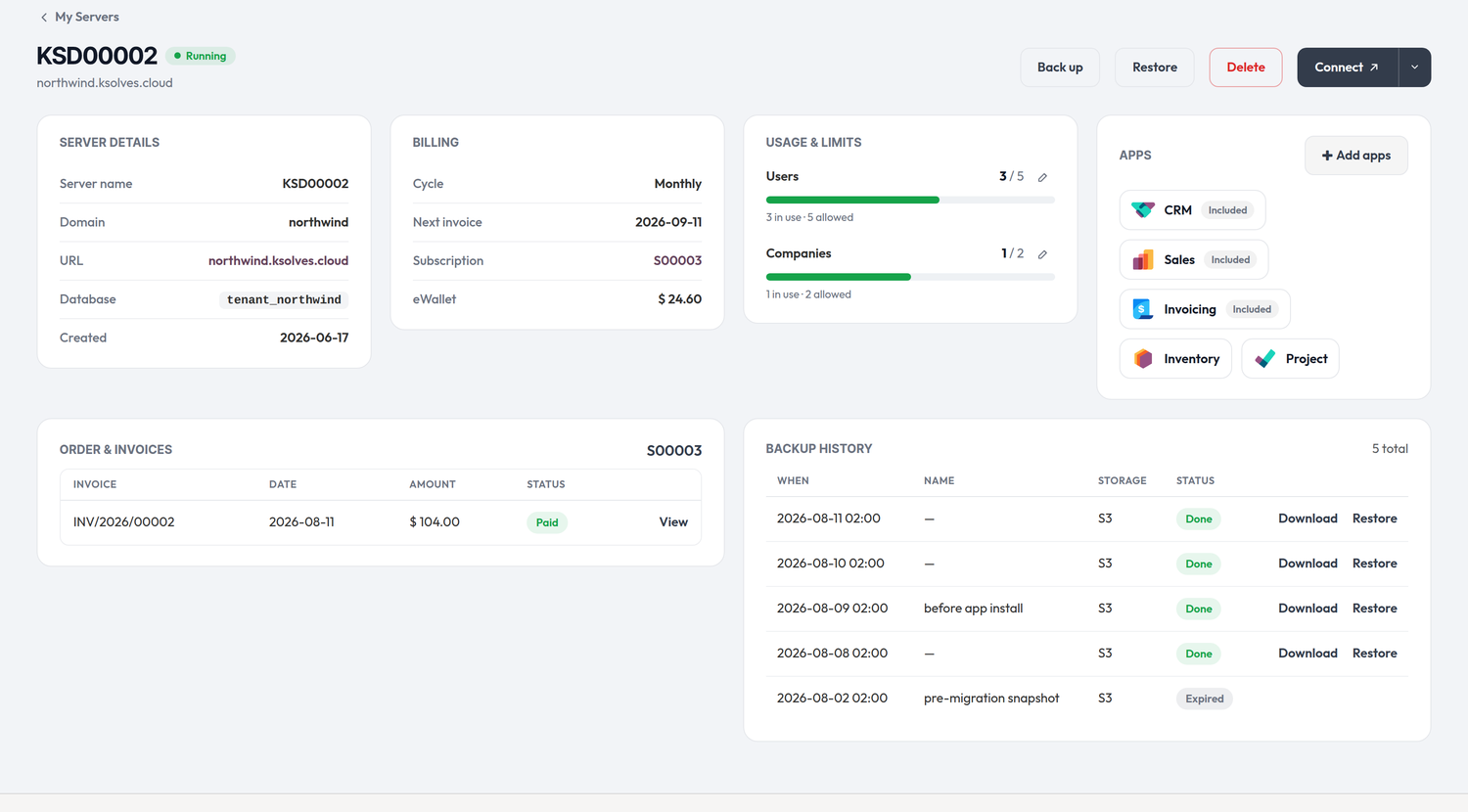
My Servers
Status, billing, seat usage, invoices, backups and access — for each server the customer owns.
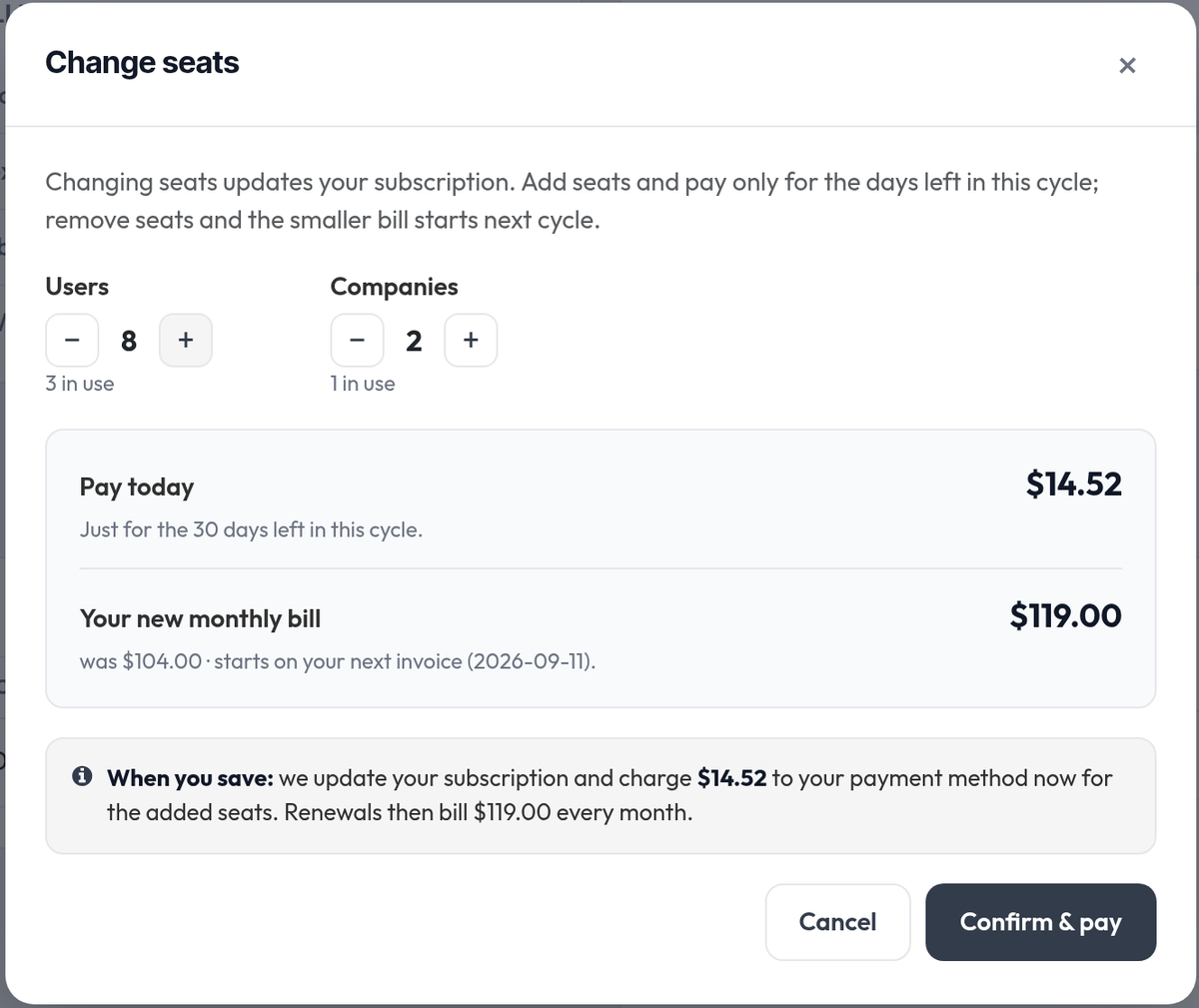
Changing seats shows the price first
- ✓Adding charges only the days left in the cycle — the amount is shown before they confirm.
- ✓Removing costs nothing today; the smaller bill starts at the next invoice.
- ✓Seats can never drop below the number actually in use.
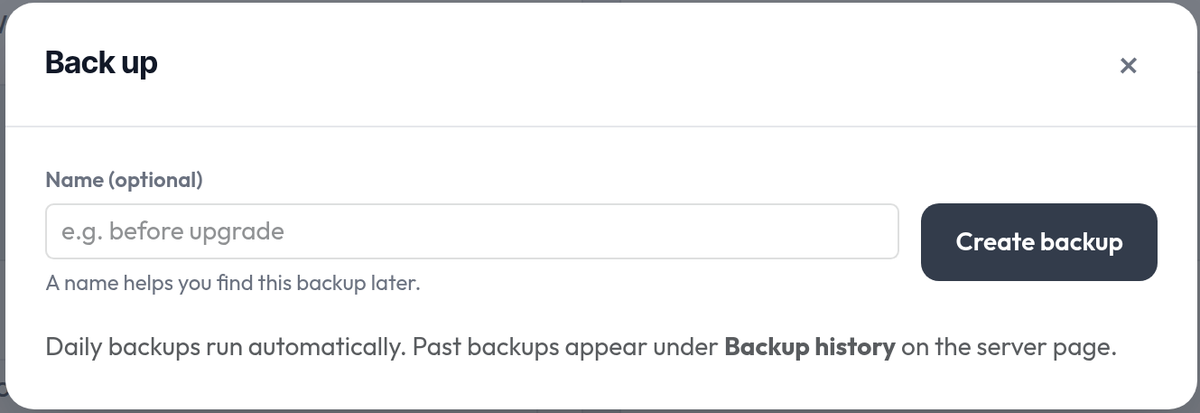
Daily backups, plus one whenever they want
- ✓Every server gets an automatic daily backup; on-demand backups can be labelled and downloaded.
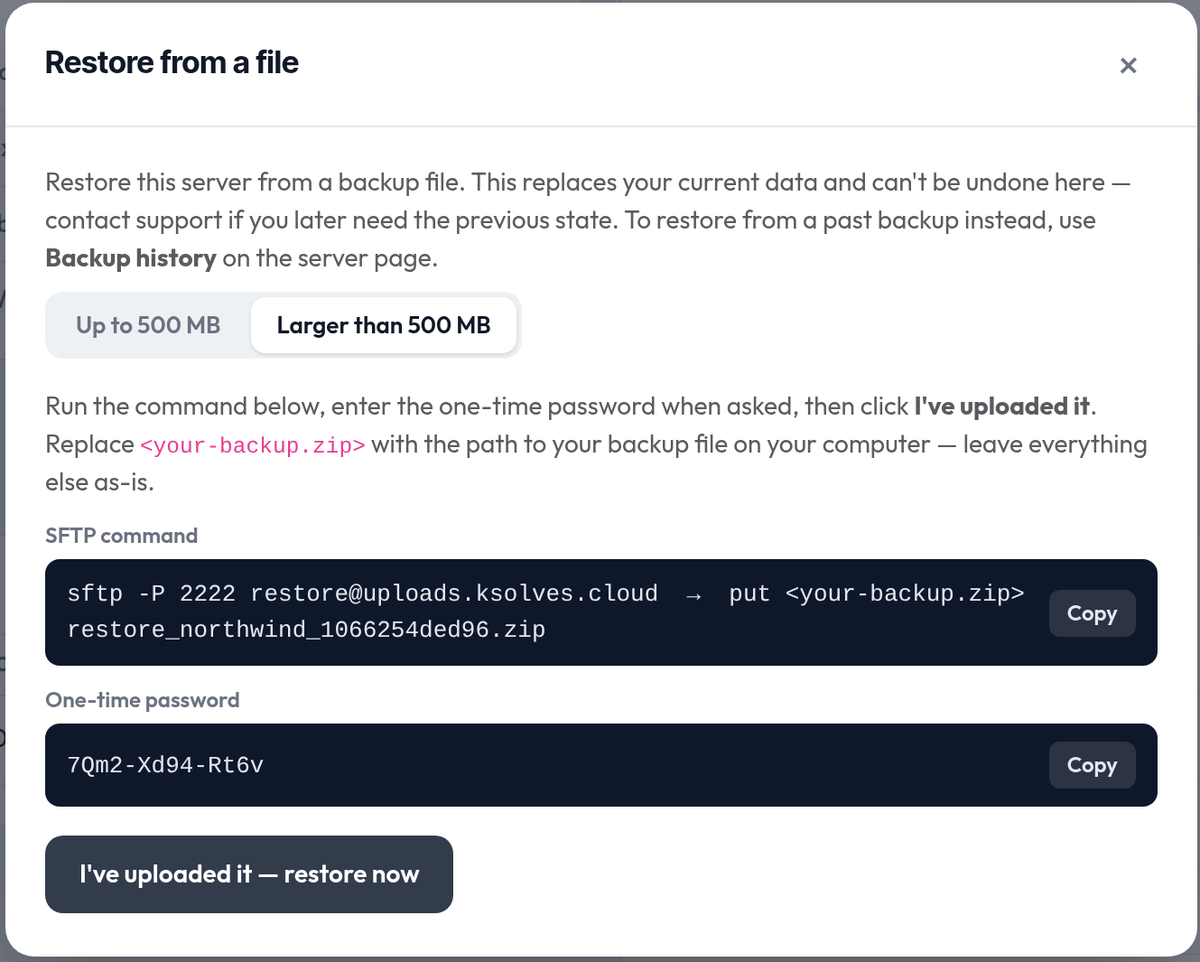
- ✓Restore from a stored backup or an uploaded file. Backups over 500 MB skip the browser — the portal issues an upload command and a one-time password.
Deleting is deliberate — and stops the bill
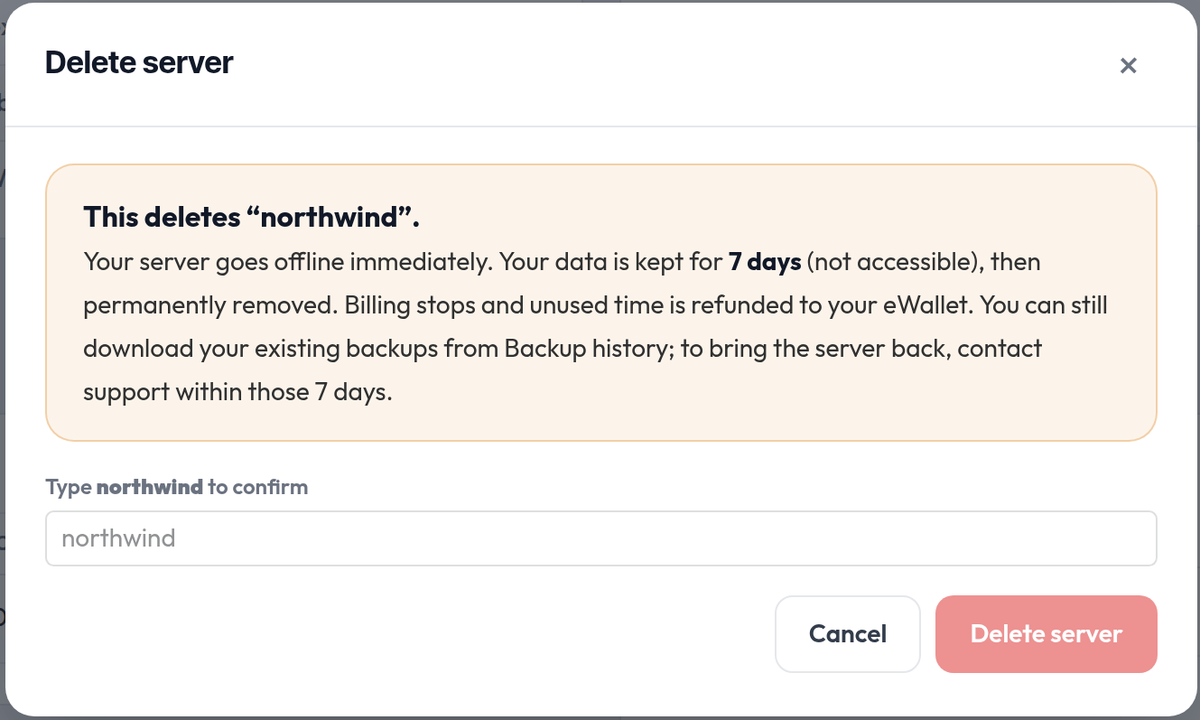
- ✓The button stays disabled until the exact domain is typed.
- ✓Data is kept for a grace window (7 days by default) before it is removed for good.
- ✓Billing stops immediately and unused paid time returns as wallet credit.
Sign in without a password yet
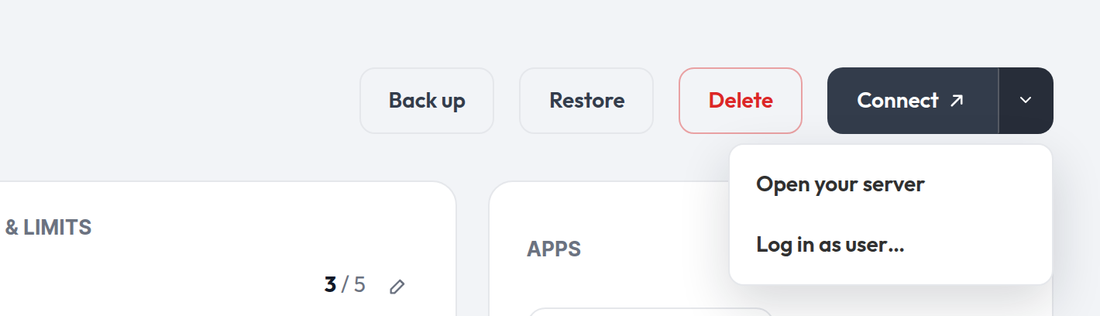
Customers can open their server, or sign in as any of its users, before the set-password email has even landed.
You run all of it from the back office
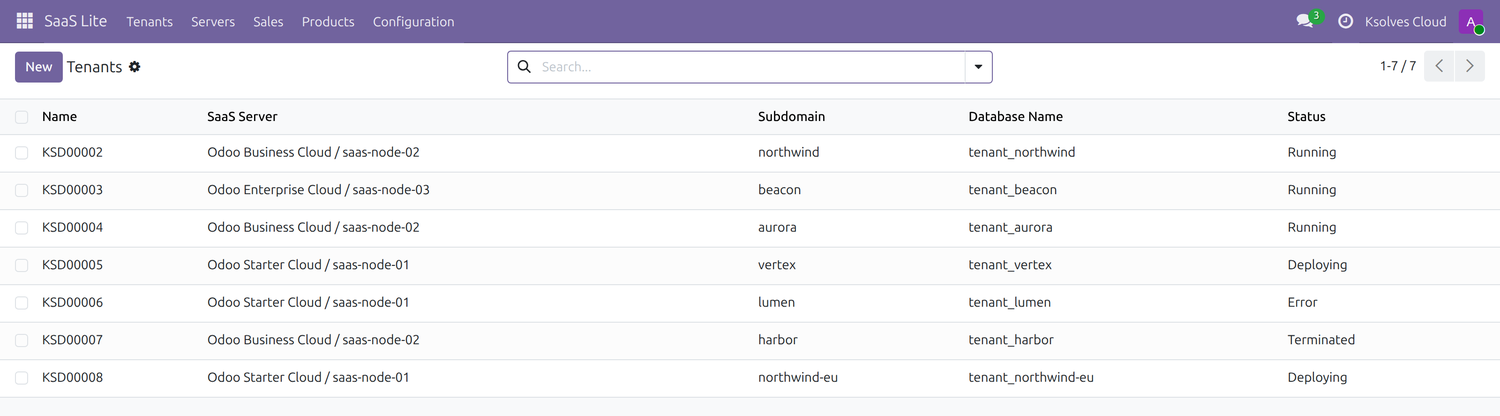
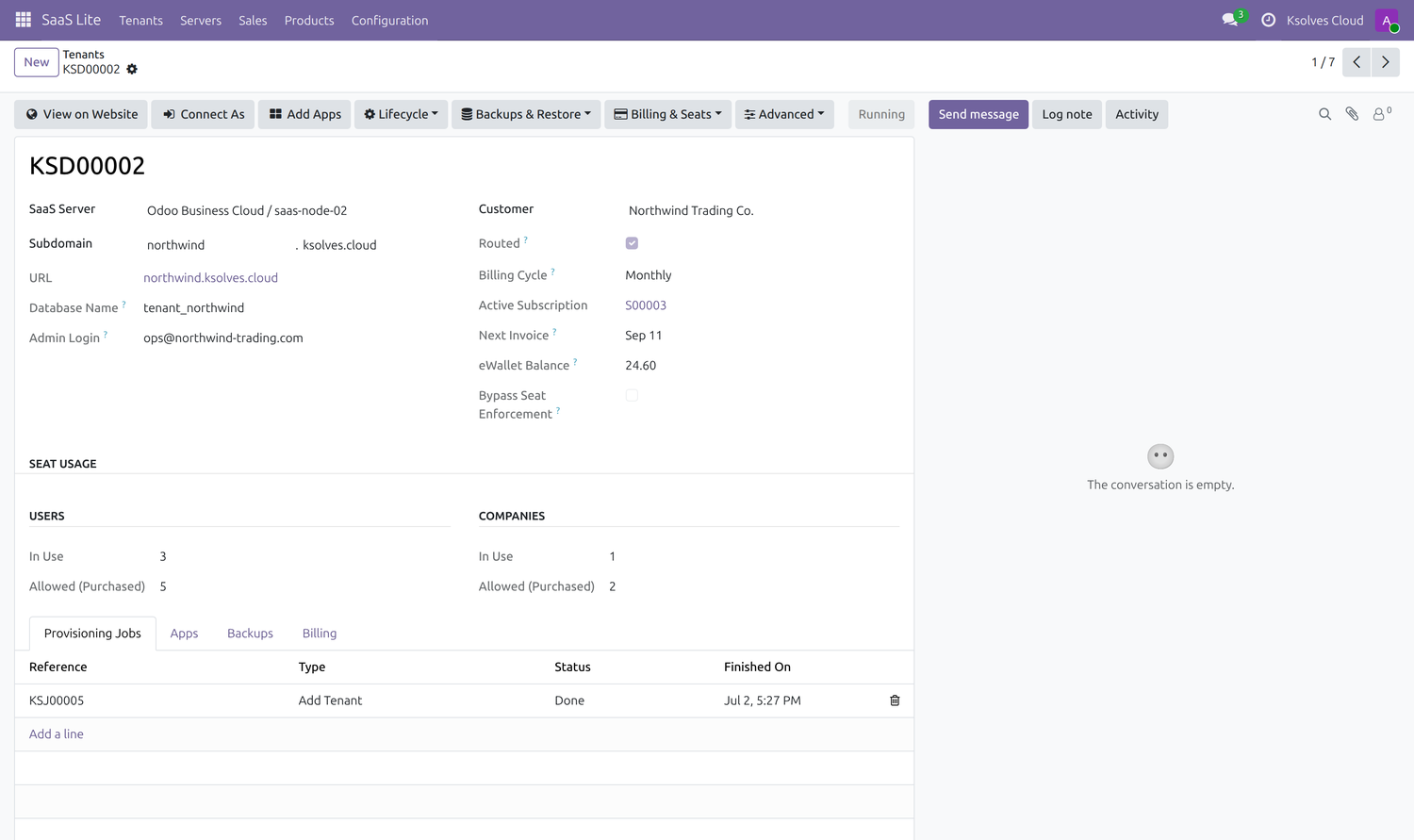
Every customer instance, every action, in Odoo.
- ✓Create, provision, back up, restore, resize and delete any instance; group the list by status, plan, server or customer.
- ✓Connect As opens a support session inside a customer's instance as one of their users, through a one-time link.
The money side
Wallet first, then card
Every invoice draws down eWallet credit before touching the saved card, so a customer holding a refund pays only the difference.
Refunds follow real money
Pro-rata credit is calculated from what was actually collected for the period, never the list price. An unpaid period earns nothing back.
Cycle switch keeps what's paid
Moving between monthly and yearly refunds the unused portion, starts the new plan today, and carries purchased seats across unchanged.
Nothing bills a dead server
Deleting or terminating an instance closes its plan and issues the refund on its own — there is no forgotten subscription left running.
Automatic renewals
Each cycle is invoiced and collected without anyone lifting a finger.
Monthly ⇆ yearly
Switch cycles in one click; unused time is refunded and seats carry over.
Everything included
Hosting plans priced per cycle
Self-service storefront & checkout
Live domain availability check
App selection at checkout
One-click provisioning
Real-time progress on every action
My Servers customer portal
Log in as any of your users
Automatic daily backups
On-demand backups & download
Restore from backup or upload
Local or S3 backup storage
Grace-period deletion
Subscription billing & eWallet
User & company seats
Mid-cycle seat scaling
Seat enforcement inside the tenant
Admin & support tooling
Installation
Two bundled modules, one extra addons path
Ksolves SaaS Lite needs two companion modules to run. Both are already inside this package — you only point Odoo at them and declare them once.
Ksolves Sales Subscription
Recurring plans, invoicing and subscription billing for every tenant.
Ksolves eWallet for Subscriptions
Prepaid wallet credit, spent before the saved card on every renewal.
Why they are not automatic dependencies. Both modules ship with this package, under ks_saas_lite/extra_addons/, but they are deliberately left out of the manifest — declaring them would mean publishing two more separate apps alongside this one. Adding them yourself is a one-time step.
Register the extra addons path
In your odoo.conf, add the bundled folder to addons_path — placed before the path that holds ks_saas_lite.
[options]
addons_path = /path/to/ks_saas_lite/extra_addons,/path/to/custom_addons,/odoo/addons
Order matters — Odoo has to resolve the two companion modules before it loads Ksolves SaaS Lite.
Declare both modules as dependencies
Open ks_saas_lite/__manifest__.py and add them to depends.
'depends': [
    'base', 'product', 'mail',
    'ks_sales_subscription',
    'ks_ewallet_extension',
],
Restart, update the app list, install
Restart Odoo with that config file, update the apps list, then install Ksolves SaaS Lite. Odoo pulls in both companion modules on its own.
./odoo-bin -c /etc/odoo/odoo.conf -d your_db -u base
Python requirement
Install paramiko in the same environment that runs Odoo: pip install paramiko
One folder to skip
extra_addons/saas_lite_infra is server-side tooling, not an Odoo module — leave it out of both addons_path and depends.
Stuck on the install? Write to sales@ksolves.com and we will walk you through it.
Why Ksolves
Built by an Odoo Gold Partner, not a side project
Ksolves is a publicly listed, CMMI Level 3 certified technology company. Odoo is one of our core practices, and our apps run in production across the world.




Trusted by teams who don't get to be offline











Support
Ksolves is open 24/7 to discuss your thoughts and queries
Free 90 days support
Ksolves provides free 90 days support for any doubt, query or bug fixing (excluding data recovery) related to this module, applicable from the date of purchase.
Onboarding, not just a download
We help you register your first hosting servers and plans and take a first instance end-to-end. Need something specific to your business? Ask us about customisation.

FAQs
Questions we get before buying
Releases
Version history
-
Multi-tenant hosting. Register the servers and plans you host on, then provision an isolated Odoo database per customer on its own subdomain, with live step-by-step progress.
-
-
-
-
-


Free 120 Days Support
Get 120 days of FREE support (doubt, queries,
& bug fixing)
on Odoo
applications from the date of purchase. Enhance the functionality of
your business with the Ksolves Odoo experts.
