
120 Days
Free Support
Free
Lifetime Update
Free
Installation
120 Days
Free Support
Free
Lifetime Update
Free
Installation





Book Your Personalised Demo Right Away




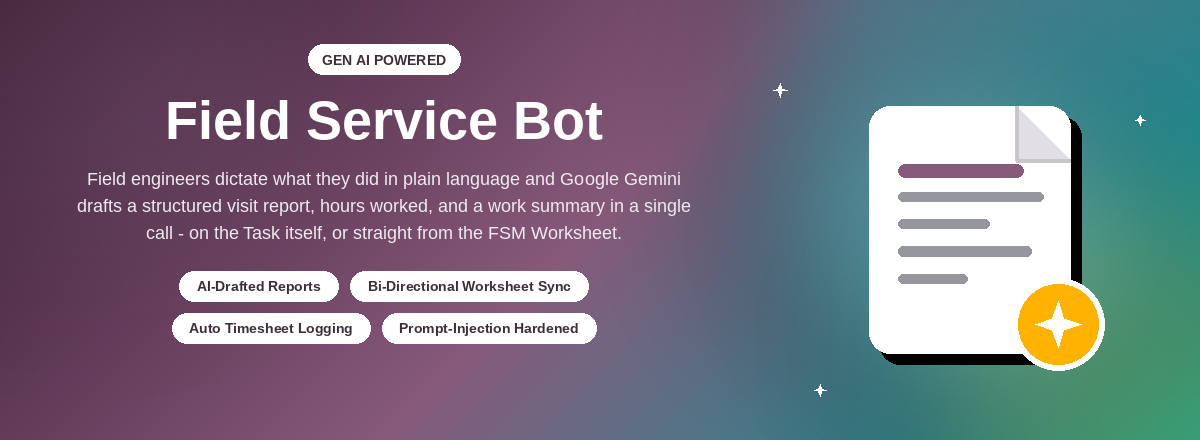
See it in action for your own Field Service team
AI-Drafted, Structured Reports
Raw field notes become a clean report with Problem Description, Root
Cause, Action Taken, Parts Replaced and Next Service Recommendation
— only for what the notes actually support, never invented.
One API Call Does It All
Report text, hours worked, a one-line work summary and the work
date are all extracted from a single Gen AI call per click —
lower cost, faster clicks, and quota that lasts longer.
Generate → Review → Approve
Every draft lands on the Description tab for the engineer to read
and correct. Nothing reaches the customer until Mark Reviewed is
clicked — the AI proposes, the engineer decides.
Bi-Directional Worksheet Sync
Works with the standard FSM Worksheet feature: generate from the
Worksheet's own filled fields, or let Generate Report write
suggested values straight back onto the Worksheet.
Automatic Timesheet Logging
Hours mentioned in the notes are logged to the engineer's
timesheet against the visit date automatically — accumulating
across a same-day visit, replacing cleanly on a redo.
Hardened Against Prompt Injection
Field notes are treated as untrusted data, never as instructions
— a dedicated prompt framing plus a pre-filter blocks the
obvious "ignore previous instructions" style attempts.
Three Report Templates
Pick Odoo's default layout or one of three professional Field
Service Report templates in Settings, with a live preview on sample data.
The same layout is printed, downloaded, emailed and shown on the Sign Report page.
Edit the Report Before Signing
On the Sign Report page, staff can correct any value of the report
— by hand, or by telling the AI what to change. For the report
and its PDF only: nothing changes in Odoo, and Undo All Edits restores it.
Gemini, ChatGPT or Claude
Choose Google Gemini, OpenAI or Anthropic Claude, each with its own
API key and model — pick from a ready-made model list, refresh it
from the provider, and check it with Test Connection.
Reads Photos & PDFs
Photos and PDFs uploaded in the Description, the task's attachments or a
chatter note go to the AI with the notes — nameplates, meter readings,
serial numbers and test sheets end up in the report and the Worksheet.
Smart Updates, No Repeats
Generating again adds only what is new: points already in the report are
not repeated, a corrected Worksheet value is corrected in place, and the same
day's additions join the existing sections — Sign Report edits are kept.
Timesheets, Worksheet & Attachments
Every template prints the timesheet lines, the Worksheet and the task's
photos and documents (as download links) in its own style, in Odoo's order
— each one switched on or off in Settings.
Standout Features Of
Field Service Bot
AI-Drafted Reports
Five-section structured drafts
Five-section structured drafts
Worksheet Sync
Bi-directional, per template
Bi-directional, per template
Timesheet Automation
Hours logged from notes
Hours logged from notes
Injection Hardened
Notes treated as untrusted data
Notes treated as untrusted data
Multi-Visit History
Merge, insert, or follow up
Merge, insert, or follow up
Full Audit Log
Every generation recorded
Every generation recorded
Report Templates
Three layouts, live preview
Three layouts, live preview
Edit Before Signing
By hand or through AI, report only
By hand or through AI, report only
Photos & PDFs Read
Uploads become report facts
Uploads become report facts
Smart Updates
No repeats, corrections in place
No repeats, corrections in place
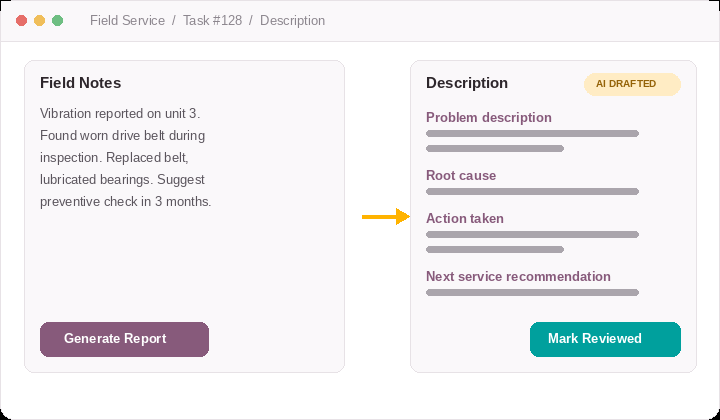
One click drafts it. The engineer still signs off on it.
Generate Report reads whatever the engineer already typed and drafts a
full report, hours, and a work summary in a single Gen AI call. It lands
straight on the Description tab, ready to correct, and Mark Reviewed is
what actually confirms it — nothing is sent to the customer before
that.
Spotlight
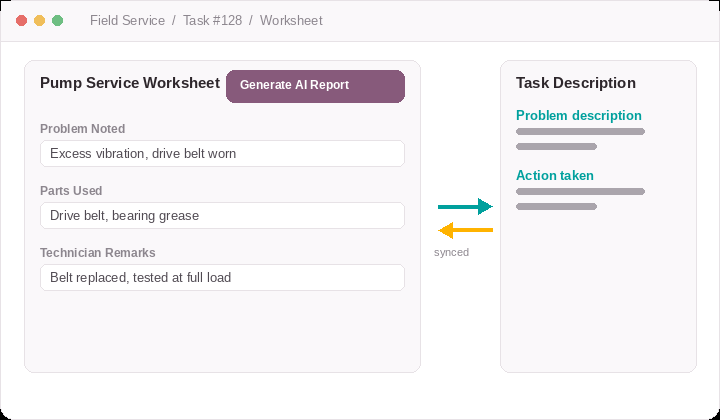
Bi-Directional Report Generation for Worksheets
A "Generate AI Report" button is added directly to every FSM
Worksheet built on a Task — automatically, for every
Worksheet template already in use, with no manual setup.
- Worksheet → Task: the Worksheet's own filled-in fields become the input notes for the same AI drafting pipeline used by Field Notes.
- Task → Worksheet: Generate Report also suggests values for the Worksheet's own fields — introspected per template.
- One source at a time: while a draft from one side is unreviewed, the other side is locked until Mark Reviewed is clicked.
Spotlight
The right report layout — and the last word before the customer signs
Choose how the Field Service Report looks, and let staff fix anything in it on
the Sign Report page — without touching a single Odoo record.
Report Templates
Odoo's default layout or one of three templates, picked in Settings with a
live preview on sample data. Show or hide the timesheets, the Worksheet and
the attachments in the report.
Edit Report Manually
Click any value right where the report shows it — report text, customer,
job and technician details, Worksheet fields, timesheet lines — and type.
Edit Report through AI
Write what to change (“serial number 2994…, fix the grammar”) and the
AI puts each value in the right field, previewed highlighted before you save.
Report Only, Undo Anytime
Changes apply to the report and its PDF only — Odoo's records stay as they
are. Undo All Edits restores the Odoo values; off by default in Settings.
Field Service Bot adds one focused capability on top of Field
Service: turning an engineer's raw notes — typed on the Task or
filled into the Worksheet, with their photos and PDFs — into a
structured, reviewable visit
report, with hours and a work summary captured in the same click. It
does not change how Field Service, Worksheets or timesheets work; it adds
a drafting step in front of them, gated by an explicit review and a
dedicated security group. On top of that, the Field Service Report can use
one of three templates, and staff can correct the report on the Sign Report
page before the customer signs — by hand or through AI, for the report
only, never changing Odoo's own records.
12+ Years
Building and supporting Odoo
Odoo Gold Partner
Official Odoo implementation partner
CMMI Level 3
Appraised development process
Ksolves supports this module directly — configuration of the Gen
AI provider, Worksheet template mapping, and any bug fixes or
enhancements. Reach out any time at
[email protected]
and the team that built it will pick it up. See the Free 90 Days Support
section further down this page for the details of what's covered.
No. It builds on top of the Worksheet feature that ships with
Field Service - Reports (industry_fsm_report) and reads/writes its
fields; it does not replace or restyle the Worksheet itself.
Your choice of Google Gemini, OpenAI (ChatGPT) or Anthropic Claude,
called directly over their APIs with a key you configure. Each
provider has its own key and model in Settings, with a ready-made model
list, a "Refresh Model List" button and a "Test Connection" button —
a newer model can be picked without any code change.
The prompt falls back to a single general "Work summary" section
for genuine work notes that don't fit the five equipment-service
sections, rather than fabricating content or rejecting the notes
outright.
A dedicated "AI Service Report Generation" security group, implied
by the standard Field Service User/Manager groups, controls both
actions.
No. Edits made with Edit Report Manually or Edit Report through AI apply
to that report and its PDF only — the task's Description, the
customer, the timesheets and the Worksheet keep their values. Undo All
Edits brings the report back to the Odoo values, and every change is noted
in the task's chatter.
Editing is off by default and switched on in Settings → Field Service
Bot → Report. Only logged-in staff who can edit the task see the
editors, and only until the report is signed; Edit Report through AI also
needs the AI security group. Customers only ever see the report.
Yes. In Settings → Field Service Bot → Report, "Choose Report
Template" opens a live preview of Odoo's default layout and the three
templates, filled with sample timesheets, Worksheet values and
attachments. Three switches show or hide the timesheets, the Worksheet
and the attachments in the report; every layout shows them in Odoo's
own order, after the report text.
Yes. Photos and PDFs added to the Description, the task's attachments or a
chatter note are sent to the AI together with the notes (Gemini, ChatGPT and
Claude all read them), so readings, nameplates, serial numbers and test
results are written into the report and the Worksheet. Large photos are
scaled down first; a file that cannot be read is listed in the chatter.
Field Service Report PDFs and received emails are never sent back to the
AI.
Only what is new is added. The AI is shown the report it adds to and does
not repeat what it already says; the same day's additions join the
existing sections instead of repeating headings. "Generate AI Report" on
the Worksheet sends only what changed since the last review — a
corrected value (e.g. the manufacturer) is corrected in the report itself,
and with nothing changed you are told so instead of getting a new draft.
Text set on the Sign Report page stays with its section.
Release 19.0.1.0.0
23rd September, 2026
Current
- Initial release: Field Notes → AI-drafted report, Generate/Mark Reviewed workflow
- Bi-directional FSM Worksheet sync (Worksheet → report and report → Worksheet fields)
- Automatic timesheet logging from AI-extracted hours and work summary
- Prompt-injection hardening and a full generation audit log
- Choice of AI provider: Google Gemini, OpenAI or Anthropic Claude, with model list and Test Connection
- Three Field Service Report templates with live preview, used for print, download, email and the Sign Report page
- Show / hide timesheets and the Worksheet in the report
- Edit the report before the customer signs — manually or through AI, report-only, with Undo All Edits
- Uploaded photos and PDFs (Description, attachments, chatter) read by the AI into the report and the Worksheet
- Smart updates: no repeated points, Worksheet corrections applied in place, same-day additions merged into their sections, Sign Report edits kept
- Timesheets, Worksheet and attachments (photos and download links) in every template, in Odoo's order, with a Show Attachments switch
- Template preview with sample timesheets, Worksheet and attachments
- Worksheet filling for contacts and other linked records, dates, options and checkboxes
Permission-Gated
A dedicated "AI Service Report Generation" group controls who can
generate and review reports.
Fully Audited
Every generation logs the raw notes and AI response for later
review or troubleshooting.
Non-Intrusive
Built on top of Field Service & Worksheets — no change to
existing FSM stages or flows, and report edits never touch Odoo records.


Free 90 Days Support
Ksolves will provide free 90-day support for any doubt, queries, and bug
fixing (excluding data recovery) or any type of issue related to this
module. This is applicable from the date of purchase.
Note
Extensively Tested on Odoo Vanilla with Ubuntu OS
Ksolves Suggested Apps










Ksolves Odoo Services
Need help or a custom enhancement?
Reach out to the Ksolves team and we'll take it from there.
[email protected]
© Ksolves India Ltd. ·
www.ksolves.com

Free 120 Days Support
Get 120 days of FREE support (doubt, queries,
& bug fixing)
on Odoo
applications from the date of purchase. Enhance the functionality of
your business with the Ksolves Odoo experts.
