

Book Your Personalised Demo Right Away
Connect Via Email

Connect Via WhatsApp

Book A Meeting

Odoo AI Document Intelligence
Upload documents, extract data via AI, and create Odoo records automatically!
AI Document Intelligence is a powerful AI-driven Odoo module that transforms your unstructured documents — PDFs, images, and scanned files — into structured Odoo records. Simply upload an invoice, purchase order, sale order, or lead document and let AI extract all key data fields and create the record for you, eliminating manual data entry and reducing errors.
Document Types Supported
Powered Data Extraction
Manual Data Entry Required
Reduction in Data Entry Hours
The Problem Every Business Faces
Enterprises of every size handle enormous volumes of documents daily — vendor invoices, purchase orders, customer quotations, and business leads. Extracting data from these documents and entering it into Odoo has historically been slow, error-prone, and labour-intensive.
- Manual data entry is slow and expensive — processing a single invoice manually takes 5–15 minutes and costs $15–$40 USD in staff time.
- High error rates cause downstream failures — a 1–3% entry error rate means wrong invoice numbers, missed payments, and audit discrepancies.
- Finance teams lose up to 30% of working hours annually to data entry — time that should be spent on approvals, analysis, and strategy.
- Rule-based OCR breaks on new formats — vendor templates change constantly, requiring IT maintenance to keep templates up to date.
- Separate tools for each document type mean no unified pipeline, no shared record list, and no cross-type duplicate detection across your business.
AI Document Intelligence solves all of this — one module, four document types, AI extraction, zero manual entry.
Document Types Supported
AI Document Intelligence supports multiple document categories out of the box, covering your most critical business workflows.
Vendor Bills & Customer Invoices
Customer Sale Orders
Vendor Purchase Orders
CRM Leads & Opportunities
How AI Document Intelligence Works
A simple 3-step process that transforms your documents into Odoo records in seconds.
Upload Document
Upload your PDF, JPEG, PNG, TIFF, BMP, or HEIF document directly from the Odoo Documents module or via the upload wizard. Select the target document type (Invoice, Sale Order, Purchase Order, or Lead).
AI Extracts Data
The AI engine analyses the document, identifies key fields — vendor/customer name, address, line items, amounts, dates, payment terms — and extracts them with a confidence score. Low-confidence results are flagged for human review.
Record Created in Odoo
With one click the extracted data is pushed into Odoo to create the corresponding record — vendor bill, customer invoice, sale order, purchase order, or CRM lead — fully populated and ready for review.
A Real-World Use Case
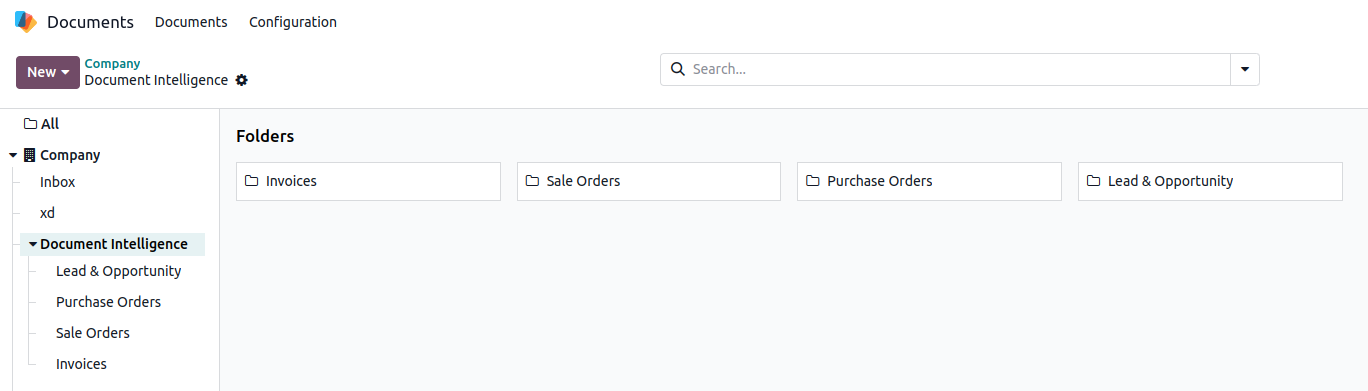
Organised AI Document Intelligence Folders
AI Document Intelligence automatically creates dedicated folders inside the Odoo Documents module — Invoices, Sale Orders, Purchase Orders, and Lead & Opportunity — so every uploaded document is neatly organised and instantly accessible.
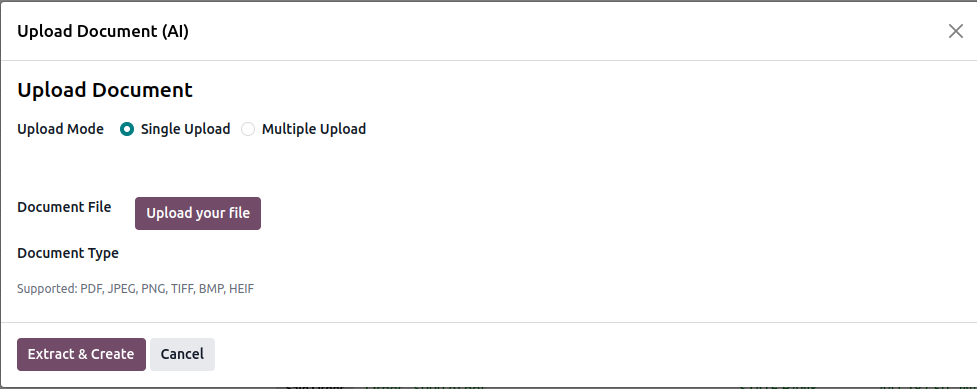
Single Upload — Quick & Simple
The guided upload wizard lets any user upload a document in seconds. Select Single Upload mode, pick your file, choose the document type, and hit Extract & Create — the AI does the rest.
- Choose between Single Upload or Multiple Upload mode
- Supports PDF, JPEG, PNG, TIFF, BMP, HEIF formats — shown inline as a reminder
- Select the Document Type (Invoice, Sale Order, Purchase Order, Lead) before extraction
- One-click Extract & Create button triggers AI processing immediately
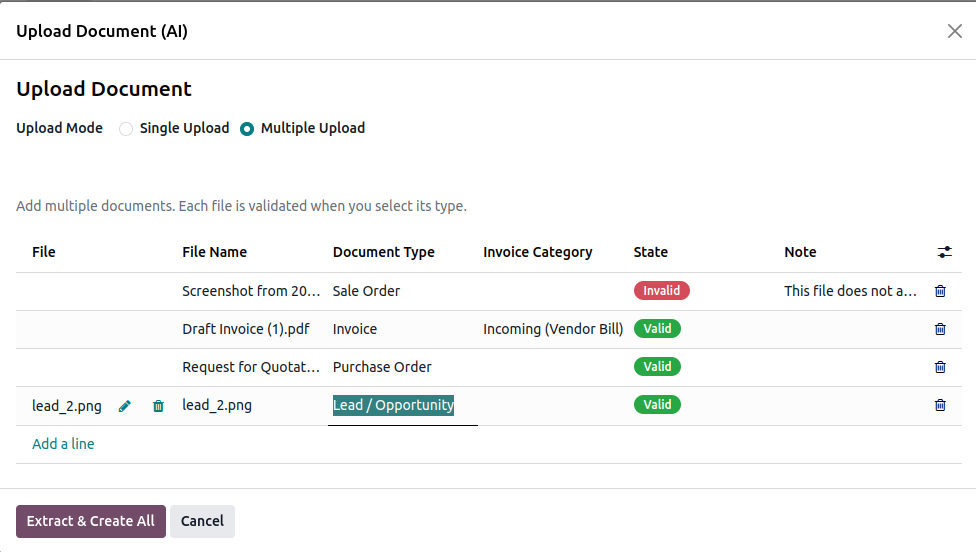
Multiple Upload — Batch Processing
Process many documents at once with the Multiple Upload mode. Add files of different types in a single wizard, validate them all, and extract everything in one go.
- Add multiple files of mixed types in a single upload session
- Assign a Document Type & Invoice Category per file independently
- Real-time validation — each row shows a Valid / Invalid status with a note explaining any issue
- Extract & Create All processes every valid file at once, skipping invalid ones
- Inline edit and delete controls on each row for quick corrections before submission
Detailed Extraction View with PDF Preview
Every extracted document gets a rich detail view — structured data on the left, the original document preview on the right — so you can verify accuracy at a glance.
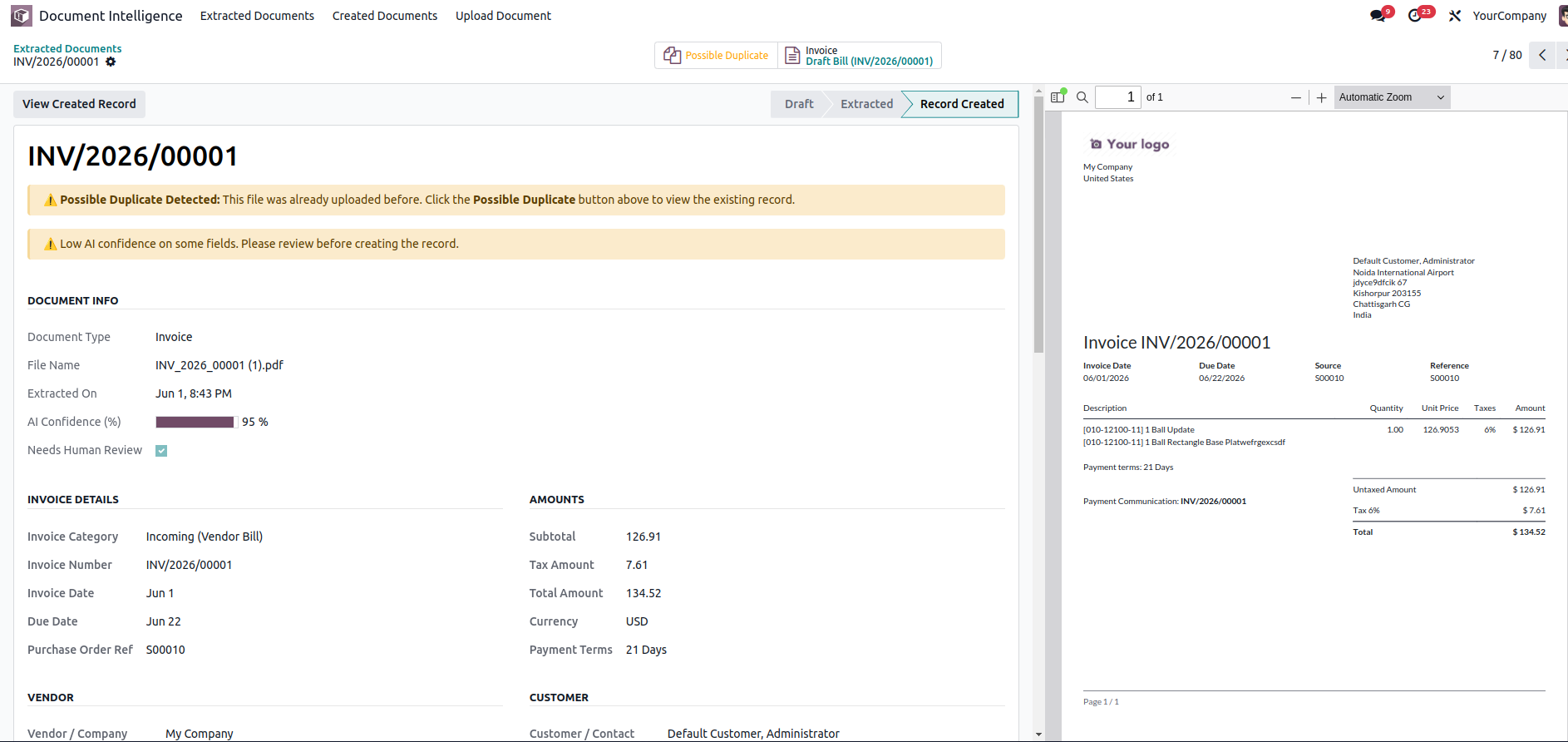
AI Confidence Score
A visual progress bar shows the overall AI confidence (e.g. 95%) so you instantly know how reliable the extraction is.
Duplicate Detection
Automatically detects if the same file was uploaded before and flags it as a Possible Duplicate with a direct link to the existing record.
Full Invoice Details
Invoice number, date, due date, purchase order reference, subtotal, tax, total, currency, payment terms, vendor & customer info — all extracted and displayed.
Side-by-Side PDF Preview
The original document renders alongside the extracted data so you can cross-check every field without switching tabs or downloading the file.
Key Features of AI Document Intelligence
Everything you need to eliminate manual data entry and accelerate your document-to-record workflow.
AI-Powered Extraction
Leverage advanced AI to automatically detect and extract structured data from unstructured documents regardless of their layout or format.
Multi-Format Support
Supports PDF, JPEG, JPG, PNG, TIFF, BMP, and HEIF formats — covering scanned documents, digital invoices, and mobile-captured images.
Confidence Scoring & Human Review
Each extraction carries an AI confidence score. Records below the threshold are automatically flagged for human review, ensuring data quality.
Multi-Document Type Support
Handle Invoices (incoming & outgoing), Sale Orders, Purchase Orders, and CRM Leads — all from a single unified interface.
Native Odoo Integration
Fully integrated with Odoo Accounting, Sales, Purchase, CRM, and Documents modules. No third-party middleware required.
Scheduled Auto-Processing
Automated cron-based processing ensures documents are extracted and records are created without manual intervention, even in bulk batches.
Intuitive Upload Wizard
A guided upload wizard makes it simple for any user to submit documents, select the document type, and trigger AI extraction in just a few clicks.
Full Audit Trail
Every extraction event is logged with status tracking (Draft → Extracted → Record Created / Error), maintaining a complete audit trail for compliance.
Configurable Settings
Manage API credentials, set confidence thresholds, and configure document folders directly from Odoo's Settings panel without touching code.
Seamlessly Integrates with Odoo Modules
AI Document Intelligence works hand-in-hand with your existing Odoo ecosystem.
Accounting
Sales
Purchase
CRM
Documents
Discuss / Mail
Unique Advantages vs. All Odoo Competitors
Features exclusive to KS AI Document Intelligence — not found in any other Odoo App Store module.
No other Odoo App Store module captures contacts, business cards, or meeting notes as CRM leads.
Claude → Azure failover is silent and automatic. No competitor offers a backup AI engine.
Pre-checks prevent wrong-type uploads from wasting API calls and creating garbage records.
Field-level confidence and automatic review flags make the quality control pipeline explicit and auditable.
Prevents duplicate vendor bills or POs — a direct financial risk control absent in all competitors.
Unattended processing of documents dropped into the Documents app without any user action.
Draft → Extracted → Record Created → Error gives operations teams a clear document pipeline view.
Every AI response is stored verbatim for compliance, debugging, and model evaluation.
Can be customised and extended freely. All competitor modules are proprietary.
Why Choose Ksolves?
Ksolves is a CMMI Level 3 certified, Odoo Gold Partner with a proven track record of delivering quality Odoo solutions to clients across the globe.
10+ Years of Odoo Expertise
Deep domain knowledge across Odoo versions, from configuration to complex custom development, ensuring your projects are delivered on time and to spec.
500+ Global Clients
Trusted by businesses across North America, Europe, the Middle East, and Asia-Pacific. Our modules are used in production by hundreds of organisations.
24/7 Dedicated Support
Round-the-clock support via email, phone, and chat. Our team responds within hours, not days, ensuring your operations never stall.
Regular Updates & Version Support
Our modules are regularly updated with new features and bug fixes. We support all active Odoo versions so you're never left behind on an upgrade.
Enterprise-Grade Security
Security-first development practices with CMMI Level 3 processes. Your data and business logic are always safe.
Odoo Gold Partner
Recognised by Odoo as a Gold Partner, validating our commitment to quality, customer success, and technical excellence.
Frequently Asked Questions
Get Support
Our dedicated support team is available 24/7 to help you with installation, configuration, and any issues you may encounter.
Release History
- AI-powered data extraction for Invoices, Sale Orders, Purchase Orders, and CRM Leads
- Support for PDF, JPEG, PNG, TIFF, BMP, and HEIF document formats
- Confidence scoring with automatic human-review flagging
- Scheduled cron-based automatic document processing
- Upload wizard for guided document submission
- Native integration with Odoo Accounting, Sales, Purchase, CRM, and Documents
- Configurable settings for API credentials and processing thresholds
- Full audit trail with status tracking (Draft → Extracted → Record Created / Error)

Free 120 Days Support
Get 120 days of FREE support (doubt, queries,
& bug fixing)
on Odoo
applications from the date of purchase. Enhance the functionality of
your business with the Ksolves Odoo experts.
